GROW with SAP: A Complete Guide to Cloud ERP for Growing Businesses
Quick Answer
GROW with SAP is SAP’s offering for companies that want to implement SAP S/4HANA Cloud Public Edition using standardized processes, guided implementation, cloud operations, and continuous innovation. It is best suited to growing organizations prepared to adopt a fit-to-standard ERP model rather than reproduce every legacy customization. The offering helps connect finance, procurement, sales, supply chain, manufacturing, projects, and services on one cloud platform, improving visibility, control, and scalability.
What Is GROW with SAP?
GROW with SAP provides a structured route to SAP Cloud ERP for fast-growing and midmarket companies. Its technology foundation is SAP S/4HANA Cloud Public Edition, a ready-to-run, multi-tenant software-as-a-service ERP. SAP operates the underlying cloud service, delivers updates, and provides preconfigured business processes based on SAP Best Practices.
GROW with SAP should not be understood as a completely separate ERP product. It is the commercial and adoption framework used to help eligible organizations start and run SAP’s public cloud ERP with implementation guidance, enablement resources, community access, and supporting services.
The core proposition is simple: adopt proven processes faster, reduce infrastructure ownership, and create an ERP foundation that can expand as the business grows.

Growing businesses face rising transaction volumes and process fragmentation before adopting cloud ERP.
Why GROW with SAP Matters for Growing Businesses
Growth creates complexity long before it creates enterprise-level discipline. New locations, legal entities, products, suppliers, customers, and employees increase the number of transactions and decisions the business must manage.
Many organizations respond by adding spreadsheets or departmental applications. These tools may solve immediate problems, but they often create fragmented data, duplicate work, and inconsistent controls. Finance may report one version of revenue while sales uses another. Procurement may place orders without current inventory visibility. Management reports may arrive after the decisions they were meant to support.
GROW with SAP addresses these constraints by establishing shared processes and a common data model. Instead of treating finance, sales, procurement, inventory, and operations as separate systems, the business manages them through an integrated ERP environment.
This matters because profitable growth depends on more than processing additional transactions. Leaders need consistent controls, timely insights, repeatable processes, and the ability to scale without repeatedly redesigning the technology landscape.
Signs Your Business Has Outgrown Its Current Systems
A cloud ERP evaluation becomes relevant when operational friction begins affecting growth, control, or customer service.
Common warning signs include:
- Teams depend on spreadsheets for operational or financial reporting.
- Departments use disconnected accounting, inventory, CRM, or production tools.
- Month-end close requires extensive manual reconciliation.
- Inventory records frequently differ from physical stock.
- Approvals remain trapped in email chains or paper workflows.
- Management cannot access current profitability, cash, order, or supply data.
- Expansion into a new location requires substantial system rework.
- IT resources spend more time maintaining infrastructure than enabling change.
Warning Signs of System Limits
Core Components of GROW with SAP
SAP S/4HANA Cloud Public Edition
SAP S/4HANA Cloud Public Edition provides the digital core. It supports integrated processes across finance, sales, sourcing and procurement, supply chain, manufacturing, projects, service, and asset-related operations, subject to the licensed scope and country availability.
Because it is a public cloud SaaS solution, customers do not manage the application infrastructure in the same manner as an on-premise ERP. SAP manages the cloud service, technical maintenance, and planned upgrades.
SAP Best Practices
Preconfigured scope items give project teams a tested starting point for common end-to-end processes. These practices reduce the need to design every workflow from the beginning and help organizations compare existing methods with a standardized target process.
Guided Implementation
SAP Activate provides a structured implementation methodology covering discovery, preparation, exploration, realization, deployment, and ongoing operation. The approach emphasizes process validation, iterative configuration, testing, data migration, training, and controlled cutover.
Embedded Analytics and AI
SAP Cloud ERP includes analytical capabilities within business processes, reducing dependence on manually consolidated reports. Available AI functionality can assist with selected tasks, insights, recommendations, and automation. Exact capabilities vary by release, configuration, licensing, role, and geography, so buyers should confirm the relevant feature scope rather than assume every advertised AI function is automatically included.
Integration and Extensibility
Organizations rarely run ERP alone. Connections may be required with CRM, payroll, banking, e-commerce, logistics, tax, plant systems, or industry applications. SAP Business Technology Platform and standard integration capabilities can support extensions and connected processes while helping protect the clean core.
Core Components of the GROW Offering
Key Business Capabilities
Financial Management
Finance teams can manage general ledger accounting, payables, receivables, asset accounting, cash-related processes, closing activities, controls, and reporting within an integrated environment. Transactions originating in procurement, sales, inventory, projects, or manufacturing can flow into finance without repeated re-entry.
The business value is faster reconciliation, stronger traceability, and more timely visibility into financial performance. Actual process coverage depends on the selected scope and localization.
Sales and Order Management
Sales processes can connect quotations, orders, pricing, delivery, billing, and financial postings. Customer-facing teams gain clearer order status, while finance receives a more consistent path from transaction to revenue.
Sourcing and Procurement
Procurement capabilities can support requisitions, purchase orders, supplier-related processes, approvals, goods receipt, and invoice verification. Standardized controls help reduce unauthorized purchasing, incomplete documentation, and manual handoffs.
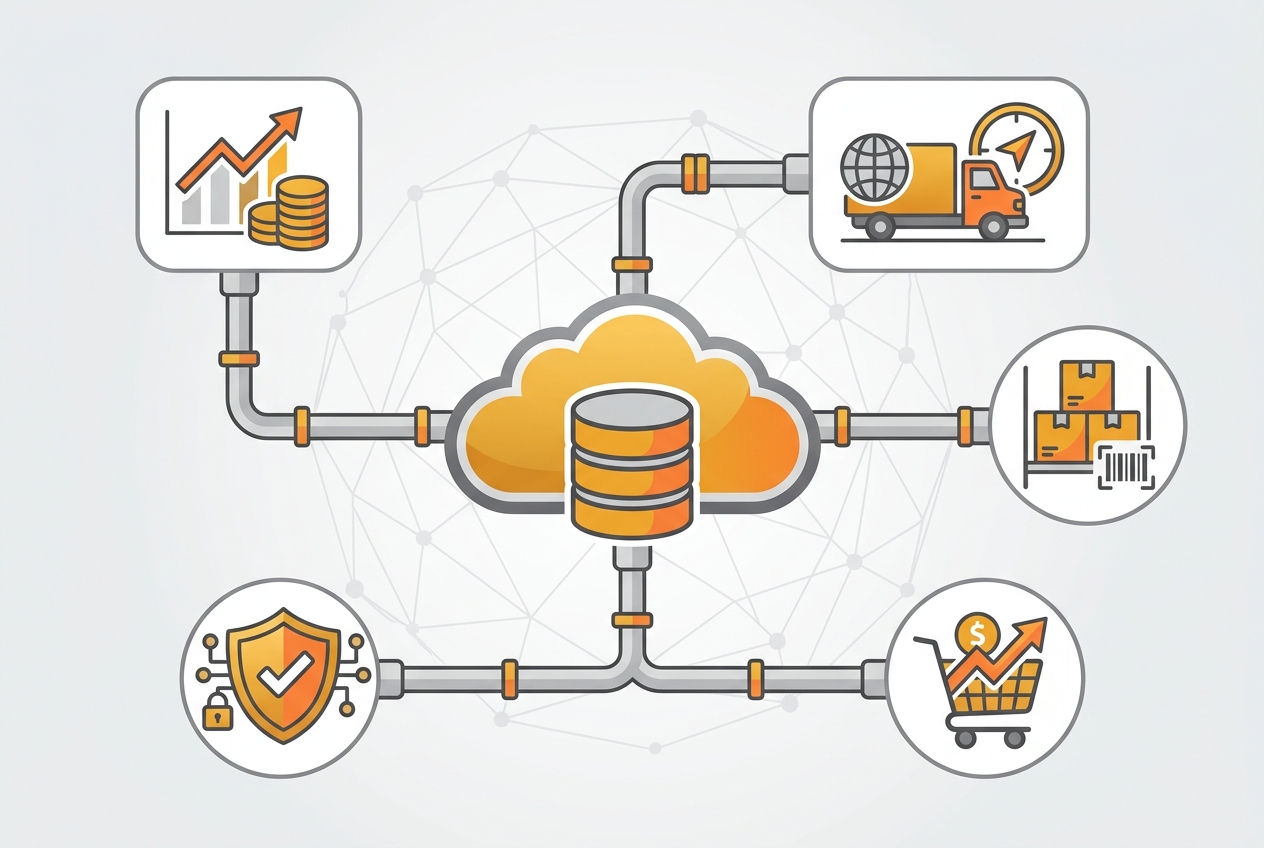
Centralizing finance, sales, sourcing, inventory, and operations on a unified digital core.
Inventory and Supply Chain
Integrated inventory processes improve visibility into stock quantities, movements, locations, valuation, and material availability. Supply teams can coordinate purchasing, planning, fulfillment, and logistics using shared operational data.
Advanced warehouse, transportation, or planning requirements must be evaluated separately because they may involve additional SAP solutions, editions, or integrations.
Manufacturing
For eligible manufacturing scenarios, the solution can support bills of material, production planning, material requirements planning, production orders, confirmations, and cost-related processes. The main advantage is the connection between demand, materials, production, inventory, procurement, and finance.
Projects and Services
Project-centric and service organizations can connect planning, staffing, time, costs, billing, and profitability processes. This improves visibility into utilization, project margin, work in progress, and customer billing.
How GROW with SAP Connects Operations
Business Benefits of GROW with SAP
Faster Time to Value
Preconfigured processes and a fit-to-standard methodology can shorten the path from design to deployment compared with heavily customized ERP programs. Speed still depends on scope, data quality, integrations, decision-making, and organizational readiness. GROW with SAP reduces avoidable complexity; it does not remove the need for disciplined project management.
Lower Infrastructure Burden
A SaaS operating model reduces the need to procure and maintain customer-managed application servers and perform traditional technical upgrades. Internal IT teams can redirect effort toward governance, integration, security, data, adoption, and business improvement.
Real-Time Operational Visibility
Integrated transactions create a more consistent source of operational and financial information. Leaders can monitor relevant KPIs without waiting for multiple departments to consolidate separate files.
Standardized Processes and Controls
Common workflows, roles, approvals, and audit trails improve consistency across locations and functions. Standardization also makes it easier to onboard employees, compare performance, and introduce shared operating policies.
Scalability
A growing company can add users, entities, processes, and supported geographies within the boundaries of the solution and contract. Scalability should be assessed across functional scope, localization, transaction volume, integration, data residency, and compliance requirements—not assumed from the word “cloud” alone.
Continuous Innovation
SAP S/4HANA Cloud Public Edition follows a managed release cycle, with major upgrades delivered twice yearly and smaller enhancements available between releases. Customers therefore avoid traditional multiyear upgrade programs, but they must establish release-readiness testing, change communication, and adoption governance.
Improved Business Agility
A standardized cloud ERP can make acquisitions, new entities, new products, and regional expansion easier to govern. The benefit is greatest when leadership resists recreating unnecessary legacy complexity.
GROW with SAP vs Traditional On-Premise ERP
The primary difference is the operating model.
With GROW with SAP, the ERP application runs as a standardized public cloud service. SAP manages the technical platform, delivers planned upgrades, and provides a defined product scope. Customers configure processes and use approved extensibility patterns rather than modifying the core without restriction.
Traditional on-premise ERP gives customers greater infrastructure control and may support deeper custom development, but it also transfers responsibility for hardware, technical operations, patching, upgrades, availability, and lifecycle management to the customer or hosting provider.
GROW with SAP is usually stronger when the business prioritizes speed, standardization, predictable cloud operations, and continuous innovation. An on-premise or private cloud approach may be more appropriate when legal, technical, operational, or customization requirements cannot be met within the public cloud scope.

Real-time analytical dashboards provide immediate visibility into business performance.
Industries That Can Benefit
Manufacturing
Growing manufacturers need better coordination between demand, materials, production, inventory, procurement, quality-related controls, costing, and delivery. GROW with SAP can provide an integrated foundation for suitable manufacturing scope, helping reduce planning gaps and improve production and margin visibility.
Wholesale and Distribution
Distributors benefit from connected purchasing, inventory, sales, fulfillment, and finance. Real-time stock and order visibility can improve replenishment decisions, customer service, and working-capital control.
Professional Services
Consulting, engineering, and other service businesses can connect projects, people, costs, billing, and profitability. Management gains clearer insight into utilization, delivery progress, and project economics.
Retail and Consumer Businesses
Retailers and consumer companies may use the platform as a financial and operational core connecting procurement, inventory, sales-related data, and reporting. Point-of-sale, merchandising, advanced forecasting, or e-commerce requirements may need complementary solutions.
Healthcare and Life Sciences
Organizations in regulated sectors can benefit from standardized controls, traceability, and audit-ready data. However, validated processes, industry regulations, batch requirements, serialization, and country-specific obligations require detailed fit analysis.
GROW with SAP Implementation Journey
1. Discover and Assess
The organization defines business objectives, current constraints, target outcomes, scope, and success measures. The assessment should examine process fit, data, integrations, extensions, security, reporting, local requirements, and change readiness.
2. Confirm Fit to Standard
Business teams review SAP Best Practices and determine how well the standard processes support operations. Each deviation should be classified as a genuine legal, competitive, or operational requirement—or simply a legacy habit.
This stage is critical because unnecessary customization increases cost, delays, and future maintenance.
3. Design the Solution and Governance
The project team finalizes scope, organizational structure, roles, controls, integrations, extension principles, reporting, migration, testing, training, and cutover. Decision rights and change-control procedures should be documented before configuration accelerates.
4. Prepare and Migrate Data
Master and transactional data must be cleansed, mapped, deduplicated, validated, and rehearsed. Poor data quality is one of the most common causes of ERP disruption. Ownership should remain with the relevant business functions rather than being delegated entirely to IT or the implementation partner.
5. Configure, Integrate, and Test
The team configures approved processes, builds necessary integrations or extensions, and conducts end-to-end testing. Testing should cover normal transactions, exceptions, controls, roles, interfaces, reports, migrated data, and critical period-end scenarios.
6. Train Users and Manage Change
Role-based training should show employees how to complete real work, not merely navigate screens. Process owners and super users need deeper preparation so they can support adoption after go-live.
7. Cut Over and Stabilize
A detailed cutover plan defines data loads, transaction freezes, opening balances, responsibilities, validation, communications, and contingency steps. After go-live, the project enters stabilization with clear issue priorities and support ownership.
8. Optimize and Adopt Releases
The organization should monitor KPIs, user adoption, control effectiveness, process performance, and release changes. Cloud ERP value increases when continuous improvement becomes part of the operating model.
The 8-Step GROW with SAP Journey
Common Implementation Risks
Excessive Customization
Attempting to reproduce every legacy workflow undermines the advantages of public cloud ERP. Use extensions only when the business case is clear and the approach is compatible with the clean-core strategy.
Weak Data Ownership
Migration teams cannot repair years of inconsistent business data without accountable owners. Finance, sales, procurement, supply chain, and operations must approve their data.
Underestimated Integrations
Interfaces frequently create hidden scope. Document each system, data flow, frequency, dependency, error process, owner, and security requirement early.
Limited Executive Involvement
ERP decisions affect policies, roles, controls, and cross-functional responsibilities. Delayed executive decisions create project delays and inconsistent design.
Insufficient Change Management
A technically correct system can still fail to deliver value when users resist standard processes, retain shadow spreadsheets, or do not understand new responsibilities.
Unrealistic Timelines
Preconfigured processes support speed, but implementation duration still depends on organizational complexity. A realistic plan protects testing, training, migration, and business continuity.
Why the Implementation Partner Matters
Emerging Alliance supports organizations through ERP readiness assessment, fit-to-standard workshops, solution design, data migration planning, integration, testing, training, cutover, and post-go-live optimization.
Conclusion
GROW with SAP offers growing businesses a structured path to SAP S/4HANA Cloud Public Edition. Its value comes from combining integrated cloud ERP, SAP Best Practices, guided implementation, embedded analytics, extensibility, and managed innovation.
It is a strong option for organizations that need better control, visibility, and scalability and are willing to adopt standardized processes. It is less suitable when critical requirements demand unrestricted customization or capabilities outside the public cloud scope.
The decision should begin with business outcomes and process fit, not product enthusiasm. A disciplined assessment, clean data, clear governance, realistic scope, and experienced implementation support are the foundations of a successful transformation.
Frequently Asked Questions
Ready to Grow with SAP?
Connect with Emerging Alliance to assess your ERP readiness and build the right cloud transformation roadmap.