
Barcode-Based Material Tracking in SAP Business One: Reducing Production Delays and Inventory Errors
Quick Answer
Barcode-based material tracking in SAP Business One helps manufacturers capture material movements through scanning and record production-related inventory transactions using an integrated barcode solution. It improves material issue accuracy, reduces manual data-entry errors, strengthens traceability and gives production and inventory teams better visibility into component consumption against production orders.
Production Delays Caused by Material Tracking Gaps
Manufacturing schedules depend on the timely availability and accurate movement of raw materials, components and semi-finished goods. When material records do not reflect actual shop-floor activity, production teams may face delays even when the required stock appears available in the system.
Manual material identification, handwritten issue records, delayed inventory updates and incorrect quantity entries can create gaps between physical stock and SAP Business One records. These discrepancies affect production planning, purchasing decisions, warehouse operations and financial reporting.
For example, a production order may require a defined quantity of components, but warehouse personnel may issue a different quantity because of manual entry errors or incorrect material identification. If the transaction is not recorded promptly, inventory reports may continue to show stock that has already been consumed.
The consequences extend beyond inventory accuracy. Production supervisors may wait for materials that are physically unavailable, purchasing teams may raise unnecessary procurement requests, and finance teams may struggle to reconcile material consumption with production costs.
Barcode-based material tracking addresses these operational gaps by connecting material identification and scanning activities with an integrated inventory and production workflow.
For manufacturers using SAP Business One, the objective is not simply to introduce barcode labels. It is to establish a controlled process in which the right material, quantity, warehouse and production reference are captured and validated before the relevant inventory transaction is recorded.
How Barcode-Based Material Tracking Works with SAP Business One
Barcode-based material tracking uses machine-readable codes to identify items and capture relevant information during warehouse and production activities. A barcode may represent an item code, batch number, serial number, packaging unit or another configured identifier.
When a warehouse or production employee scans a material label, the connected barcode application reads the code and retrieves the associated information. Depending on the integration design, the application can validate the item against a production order, check the quantity, identify the warehouse or bin location, and prepare the corresponding inventory transaction.
The validated transaction can then be recorded in SAP Business One through the supported integration.
A typical workflow includes:
End-to-End Barcode Material Tracking Workflow
This workflow reduces reliance on repeated manual entry. It also creates a more consistent connection between physical material movement and the inventory records maintained in the ERP system.
The precise workflow depends on the barcode application, integration architecture, SAP Business One configuration and the manufacturer’s operating procedures. Scanning does not automatically guarantee that every transaction is posted correctly. Validation, exception handling and transaction controls must be designed as part of the implementation.
Material Issue Against Production Orders
Material issue is a critical control point in manufacturing because it records the components consumed by a production order. Incorrect material issue transactions can affect stock availability, production costing and the accuracy of manufacturing records.
In SAP Business One, manufacturers can manage production orders and issue components through supported production processes. The system provides manual issue and backflush approaches, depending on the production setup and business requirements.
A barcode integration can strengthen the material issue process by capturing the component details at the point of movement.
Consider a manufacturer producing industrial equipment. A production order requires several electrical components, fasteners and fabricated parts. Warehouse personnel must identify the correct items and issue the required quantities to the production process.
With a barcode-enabled workflow, employees scan the component labels instead of repeatedly searching for item codes and entering them manually. The integrated application can compare the scanned components with the production order requirements and flag mismatches before transaction submission, if those validations are supported by the solution.
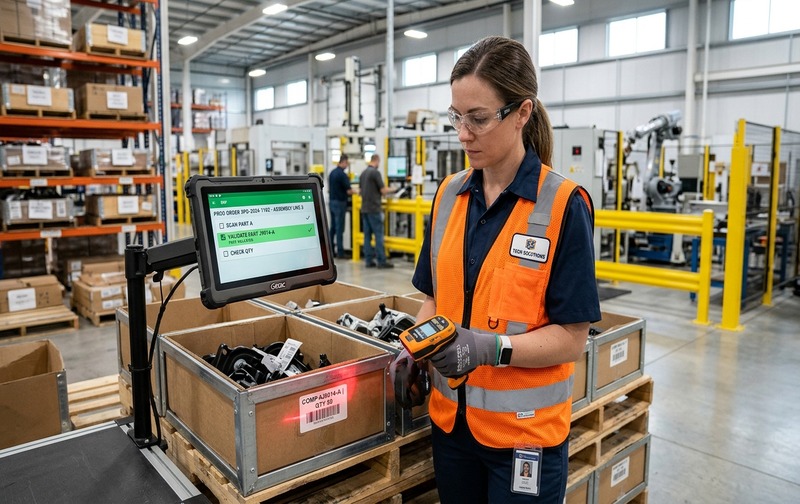
Real-time material issue scanning: Rugged mobile scanners validate component part numbers, batches, and issue quantities against SAP Business One production orders before physical consumption.
This creates several operational controls:
These controls are particularly relevant when manufacturers handle large component catalogues, multiple production orders or frequent material movements across warehouses.
However, barcode scanning should not be treated as a substitute for production planning or inventory governance. Bill of Materials accuracy, item master quality, units of measure and production order discipline remain essential.
Manual Material Issue and Backflush Controls
Manufacturers should understand the difference between manual material issue and backflush before selecting a barcode integration workflow.
With manual issue, component quantities are recorded when materials are issued to a production order. This approach can provide closer control over the actual material movement, particularly when consumption varies between production runs or when materials are issued in stages.
Backflush records component consumption based on the production process and the quantities defined through the applicable production setup. It can reduce transaction effort when consumption is predictable and the production process is sufficiently controlled.
Neither method is automatically suitable for every manufacturing environment.
Manual issue may be more appropriate when actual consumption needs to be captured at the time of material movement. Backflush may be suitable when the production process follows reliable component consumption assumptions and the business can manage exceptions effectively.
Barcode integration can support material identification and transaction capture within a configured workflow. It does not eliminate the need to choose the correct issue method or verify how the integration interacts with SAP Business One production documents.
Before implementation, manufacturers should evaluate:
- ✔ Whether components are issued in full or in multiple stages.
- ✔ Whether actual consumption frequently differs from planned quantities.
- ✔ How material returns and excess components are recorded.
- ✔ Whether batch-managed or serial-managed items require additional validation.
- ✔ How production scrap, substitutions and quantity variances are handled.
- ✔ Whether the barcode application supports the selected issue process.
A well-defined issue method helps prevent duplicate consumption, incomplete postings and discrepancies between planned and actual material usage.
Improving Inventory Accuracy Across Warehouse Operations
Inventory errors often develop when physical stock movements are not recorded accurately or promptly. Manual data entry, incorrect item selection, unrecorded returns and delayed transaction posting can gradually reduce confidence in stock reports.
Barcode-based inventory tracking improves the consistency of material identification during warehouse activities. When integrated with SAP Business One, scanning can support selected inventory transactions and provide a more controlled method of capturing item and quantity information.
The operational benefits depend on the transactions covered by the integration.
These processes help reduce the gap between physical inventory and ERP records. They also improve the reliability of information used by warehouse managers, production planners and purchasing teams.
Manufacturers should confirm which transactions are supported by the selected barcode application. A solution designed only for production material issue may not provide complete warehouse transaction coverage.
Batch, Serial and Bin-Level Traceability
Material traceability becomes more important when manufacturers handle regulated components, quality-sensitive materials, customer-specific products or items that require batch and serial identification.
A basic item barcode may identify the material but may not contain every detail needed for traceability. Batch numbers, serial numbers, expiry dates, warehouse locations and other attributes may need to be captured separately, depending on the barcode format and application design.
For batch-managed materials, the workflow should connect the scanned item with the correct batch information. This helps manufacturers identify which material lot was issued to a production order and supports subsequent investigation when quality or supplier issues arise.
For serial-managed materials, the process may require scanning individual serial numbers rather than only capturing an overall quantity. The integration should validate whether the scanned serial numbers are appropriate for the relevant transaction.
Bin-level tracking introduces another control. Where bin locations are enabled and used, the barcode workflow should identify the correct source or destination location for the inventory movement.
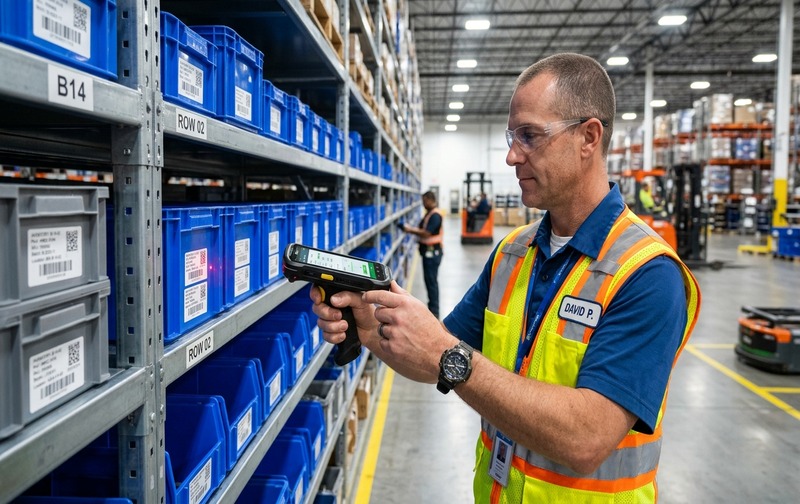
Batch, serial, and bin-level traceability: Integrated barcode scanning captures lot numbers and storage bin locations directly into SAP Business One, eliminating stock discrepancies.
Manufacturers should define traceability requirements before selecting barcode hardware or software. Important considerations include:
- Whether item-level, batch-level or serial-level identification is required.
- Whether barcode labels follow internal standards or GS1 formats.
- Whether multiple units of measure or packaging levels are involved.
- Whether warehouse and bin details must be captured during scanning.
- Whether material history must be traceable to a production order.
- How incorrect, damaged or unreadable labels are handled.
Barcode integration can improve the capture of traceability information, but it cannot compensate for missing batch records, inaccurate master data or poorly defined quality procedures.
Barcode Integration Architecture and Implementation Requirements
A successful barcode implementation requires more than scanners and printed labels. Manufacturers must establish how scanning devices communicate with the barcode application and how validated transactions reach SAP Business One.
A typical architecture includes barcode labels, scanning devices, a barcode application and an integration layer that communicates with SAP Business One through supported methods.
The barcode application handles the scanning workflow and may apply business validations before submitting transactions. The integration layer transfers the required information to SAP Business One, where the transaction is processed according to the configured system rules.
The architecture should be selected based on transaction volume, warehouse conditions, network reliability, security requirements and the complexity of manufacturing operations.
These requirements help ensure that barcode integration supports actual operating conditions rather than simply digitising an existing manual process.
Manufacturing Use Cases for Barcode-Enabled Material Tracking
The value of barcode-based material tracking differs across manufacturing environments. The most useful implementation begins with the transactions that create the greatest operational risk.
Discrete manufacturing
Manufacturers assembling machinery, electrical equipment or industrial products may manage hundreds of components across multiple production orders. Barcode scanning can help verify component identity and capture material issues against the relevant order.
Automotive component manufacturing
Component manufacturers may handle multiple part numbers, supplier batches and production stages. A configured barcode workflow can support material identification and traceability during selected warehouse and production transactions.
Pharmaceutical manufacturing
Pharmaceutical operations may require strict batch identification, material status controls and documented movement history. Barcode integration should be aligned with the manufacturer’s quality procedures and applicable regulatory requirements. Scanning alone does not establish regulatory compliance.
Electronics manufacturing
Electronics manufacturers often manage components with specific part numbers, packaging quantities and, in some cases, serial or lot tracking. Barcode scanning can reduce the risk of incorrect component selection during material issue and stock movement.
Fabrication and metal manufacturing
Fabrication businesses may move raw materials, cut components and semi-finished goods through several production stages. Barcode identification can help capture material movements and improve visibility into the inventory assigned to each production activity.
In each case, the implementation should be based on a documented process review. Manufacturers should identify where material errors occur, which transactions need validation and what information management needs to monitor.
Business Impact of Accurate Production Material Tracking
Barcode integration should be evaluated through measurable operating improvements rather than the number of scanners deployed or labels printed.
The first area to assess is material issue accuracy. Manufacturers can compare the frequency of incorrect item selection, quantity corrections and rejected transactions before and after implementation.
The second is inventory reconciliation. Businesses can monitor differences between physical stock and system records across selected materials, warehouses and transaction types.
The third is production delay. Operations teams can record delays associated with missing materials, incorrect issues, stock discrepancies and late transaction updates. This helps determine whether improved material capture is reducing avoidable interruptions.
The fourth is transaction discipline. Management can review whether production material movements are recorded promptly and whether employees follow the intended scanning workflow.
A practical measurement framework may include:
| Operational measure | What management should monitor |
|---|---|
| Material issue accuracy | Incorrect item or quantity transactions |
| Inventory variance | Difference between physical and recorded stock |
| Production material delays | Delays caused by unavailable or incorrectly recorded materials |
| Transaction correction rate | Number of issue or return transactions requiring correction |
| Traceability completeness | Availability of required item, batch or serial references |
| Posting delays | Time between physical movement and ERP transaction recording |
The baseline should be established before implementation. Targets should be agreed with operations and finance teams rather than assumed in advance.
This approach gives CEOs, COOs and finance leaders a clearer basis for evaluating the business case. It also helps IT teams assess whether the integration is delivering the required controls.
Evaluating Barcode Integration for SAP Business One
Selecting a barcode solution requires an assessment of both operational fit and technical compatibility. A scanner that reads labels correctly is not sufficient if the connected application cannot validate the transaction or handle exceptions.
Manufacturers should evaluate the following areas before implementation.
The right solution should fit the manufacturer’s production and inventory processes. It should also preserve the integrity of SAP Business One records and provide a controlled method of handling exceptions.
Improving Production Control with Emerging Alliance
Manufacturers need accurate material information to coordinate purchasing, warehouse operations, production execution and financial control. When physical material movements are not reflected correctly in ERP records, the resulting discrepancies can affect production schedules and management decisions.
Emerging Alliance supports businesses using SAP Business One through implementation, customization, integration and related ERP services. Its barcode solution offering can be evaluated in the context of the manufacturer’s material movement requirements, production processes and inventory controls.
A structured assessment should begin with the existing workflow: how materials are received, identified, stored, issued to production, returned and reconciled. The next step is to identify which activities require barcode capture and how those transactions should integrate with SAP Business One.
This process helps determine the required scanner workflow, label structure, validation rules, integration requirements and reporting controls before implementation begins.
For manufacturing leaders, the objective is clear: improve the accuracy of material movement records, reduce avoidable production interruptions and strengthen visibility across inventory and production operations.