Grow with SAP: Benefits, Requirements, and Key Decisions for Mid-Sized Businesses
Quick Answer
Grow with SAP helps mid-sized businesses evaluate and adopt SAP Cloud ERP using standardized business processes, cloud-based capabilities, and guided implementation approaches. Its suitability depends on operational complexity, process readiness, data quality, integration requirements, budget, and growth plans. Before committing, decision-makers should assess implementation scope, customization needs, migration risks, ongoing costs, and the expertise required to manage the new ERP environment.
What Grow with SAP Means for Mid-Sized Businesses
Grow with SAP, also presented by SAP as GROW with SAP, is an offering designed to help businesses adopt SAP Cloud ERP, particularly SAP S/4HANA Cloud Public Edition. It combines cloud ERP capabilities with implementation guidance, standardized processes, and supporting technologies intended to help organizations establish a more structured operating environment.
For mid-sized businesses, the decision is not simply whether to move to the cloud. It is whether the proposed ERP environment can support current operations, improve management visibility, and accommodate future business requirements without creating unnecessary complexity.
Many growing companies reach a point where spreadsheets, disconnected applications, manual approvals, and department-specific systems make it harder to maintain consistent information. Finance teams may struggle to reconcile figures across systems, operations teams may lack timely inventory information, and leadership may find it difficult to obtain a consolidated view of performance.
An ERP platform can help bring core business processes and data into a more coordinated environment. However, the outcome depends on how well the solution fits the organization’s processes and how effectively the implementation is planned.
Grow with SAP should therefore be evaluated as a business and operating-model decision, not merely a software purchase.
Key Benefits of Grow with SAP
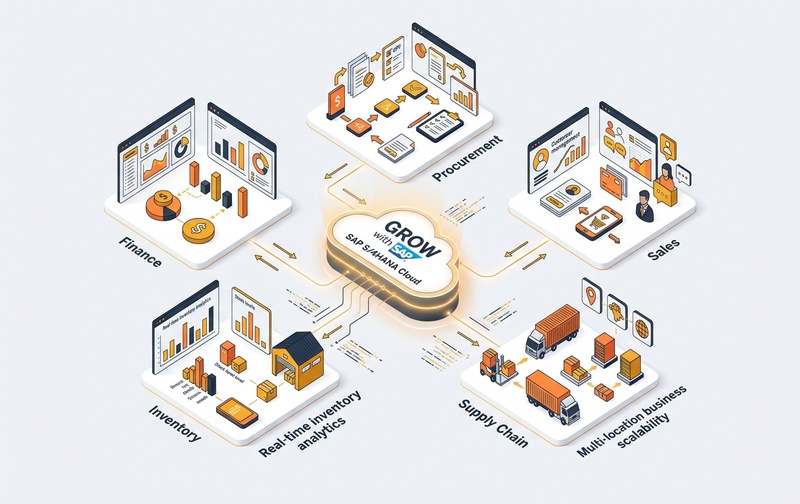
Standardized Business Processes
Growing businesses often develop different procedures across departments, locations, or business units. Over time, these differences can create inconsistent records, repeated work, and complicated reporting.
A standardized ERP approach can help establish common processes for areas such as finance, procurement, sales, inventory, and supply chain management. This gives teams a more consistent basis for recording transactions and managing approvals.
Standardization also requires business decisions. Organizations must identify which existing procedures are genuinely necessary and which have developed through habit, outdated systems, or workarounds.
The objective is not to force every operation into an unsuitable process. It is to determine where standard practices can improve consistency and where legitimate business requirements need further evaluation.
Cloud-Based ERP Operations
A cloud ERP environment can reduce the need for a business to manage the underlying application infrastructure itself. The scope of infrastructure management, technical responsibilities, service commitments, and updates depends on the selected subscription and service arrangements.
For mid-sized organizations with limited internal IT capacity, this operating model may help shift attention toward application governance, process improvement, data quality, and business outcomes.
Cloud adoption does not eliminate every technology responsibility. Companies still need to manage user access, integrations, data governance, testing, business continuity, and coordination with their implementation and service providers.
Better Access to Business Information
When departments maintain separate systems, decision-makers may receive conflicting reports or spend time reconciling information before acting.
An appropriately implemented ERP environment can improve access to consistent operational and financial data. Finance leaders may gain better visibility into transactions and reporting, while operations leaders can assess relevant information about purchasing, stock, orders, and business activity.
The value depends on data accuracy, transaction discipline, reporting design, and the quality of integration with systems outside the ERP environment.
Support for Business Growth
A growing company may need to add employees, locations, products, suppliers, or business processes without repeatedly redesigning its entire technology environment.
A cloud ERP platform can provide a structured foundation for growth, but scalability must be assessed against the organization’s actual requirements. Transaction volumes, legal entities, geographic operations, reporting needs, industry processes, and integrations can all influence the solution design.
Decision-makers should assess whether the proposed scope supports both current operations and realistic future requirements.
Access to Evolving ERP Capabilities
SAP continues to develop cloud ERP capabilities, including automation, analytics, and AI-related functionality. The availability of individual capabilities depends on the product edition, subscription, region, release, licensing, and technical prerequisites.
Businesses should not assume that every AI or automation capability is automatically included or ready for immediate use.
Instead, identify specific operational problems that could benefit from automation or better analytics. Then confirm the relevant capability, availability, cost, data requirements, and implementation effort with SAP or the implementation partner.
Which Businesses Are a Good Fit for Grow with SAP?
Grow with SAP may be worth evaluating when a mid-sized business wants a standardized cloud ERP environment and is prepared to align its processes with the selected solution.
Potentially suitable organizations include:
- Businesses replacing fragmented legacy applications with a more coordinated ERP environment.
- Companies seeking greater consistency across finance, procurement, sales, and operations.
- Organizations planning expansion that requires stronger process governance and reporting.
- Businesses willing to review existing workflows and reduce unnecessary customization.
- Companies with leadership support for process change, data preparation, and user adoption.
However, the offering may require closer evaluation where operations depend on extensive industry-specific functionality, highly customized workflows, complex integrations, or unusual deployment constraints.
That does not automatically make the solution unsuitable. It means the business must validate those requirements before finalizing the scope.
A company should also compare the proposed offering with other ERP options where existing investments, operational complexity, deployment preferences, or total cost may point toward a different approach.
Grow with SAP Readiness Requirements
Selecting an ERP platform before assessing business readiness can lead to unclear scope, repeated design changes, migration problems, and delays.
Before proceeding, decision-makers should review the following areas.
Business Process Readiness
Document how important processes work today, including order processing, procurement, inventory movements, financial posting, approvals, and reporting.
Identify recurring problems such as duplicate data entry, manual reconciliations, inconsistent approvals, and disconnected departmental workflows. Rank these issues by their operational or financial impact.
The purpose is to distinguish essential business requirements from existing practices that can be simplified.
Data Quality and Migration
ERP implementation involves more than transferring records into a new system. Businesses must identify which data needs to be migrated, determine how it should be structured, and validate its accuracy before and after migration.
Important data categories may include customer and supplier records, products, inventory balances, open transactions, financial information, and relevant historical records.
Duplicate records, inconsistent units of measure, incomplete master data, and unreconciled balances can undermine reporting and transaction processing after go-live.
Establish data owners, cleansing rules, reconciliation procedures, and acceptance criteria before migration begins.
Integration Requirements
Mid-sized companies may depend on CRM platforms, e-commerce systems, warehouse applications, banking services, payroll tools, reporting platforms, or industry-specific software.
Each integration should be assessed for its business purpose, data exchanged, transaction frequency, error handling, security requirements, and support ownership.
A system that appears suitable in isolation may create operational gaps if a critical integration cannot be delivered within the required scope, budget, or timeline.
Internal Ownership and User Adoption
ERP projects need more than technical resources. Business leaders must assign process owners, approve decisions, resolve conflicting requirements, and make time for testing and training.
Employees also need to understand how workflows will change. Without sufficient communication and training, users may continue relying on spreadsheets or informal workarounds, weakening the value of the new system.
A readiness assessment should identify accountable stakeholders and the time they can realistically commit.
Grow with SAP Implementation: Scope, Timing, and Risks
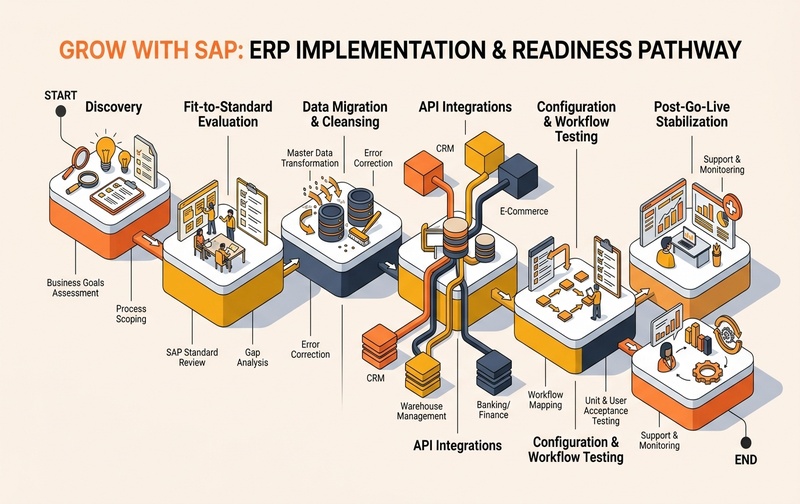
Implementation schedules vary according to business scope, data readiness, integrations, customization, decision-making speed, testing requirements, and resource availability. A timeline advertised for a standardized implementation should not be treated as a guaranteed schedule for every organization.
A practical implementation plan should define the activities and approvals required at each stage.
1. Discovery and requirements assessment
Document business objectives, current process gaps, reporting needs, integration dependencies, and major implementation risks. Establish measurable success criteria before selecting the final scope.
2. Fit-to-standard evaluation
Compare business requirements with the standard capabilities of the proposed ERP solution. Classify requirements as standard, configurable, integration-dependent, or requiring additional development or alternative functionality.
3. Data and integration preparation
Define migration responsibilities, cleanse data, confirm integration designs, and prepare test scenarios. Address dependencies early instead of leaving them until final testing.
4. Configuration and validation
Configure the agreed scope and validate critical business scenarios. Testing should cover complete workflows, not merely individual screens or transactions.
5. Training and go-live preparation
Prepare users, confirm access permissions, reconcile migration results, test reporting, and establish support and escalation procedures.
6. Post-go-live stabilization
Monitor transaction processing, reporting accuracy, integration errors, user adoption, and unresolved issues. Assign clear owners for incident resolution and improvement activities.
Key implementation risks include unclear requirements, uncontrolled scope changes, poor data quality, integration failures, inadequate testing, and limited business participation. These risks should be recorded, assigned to accountable owners, and reviewed throughout the project.
Grow with SAP Costs and Total Cost of Ownership
The cost of adopting Grow with SAP cannot be determined from the product name alone. Pricing and total investment depend on the applicable commercial package, licensing or subscription terms, users, implementation scope, integrations, migration effort, additional services, and ongoing operational requirements.
Decision-makers should evaluate the full cost over an agreed period rather than comparing subscription prices alone.
Include the following cost categories in the business case:
- ERP subscription: Confirm the applicable package, included capabilities, user entitlements, and contractual terms.
- Implementation services: Assess discovery, configuration, project management, testing, deployment, and training.
- Data migration: Estimate cleansing, mapping, validation, reconciliation, and historical-data requirements.
- Integrations and extensions: Identify the cost of connecting external applications or delivering approved additional functionality.
- Internal resources: Account for employee time spent on workshops, decisions, testing, training, and change management.
- Ongoing support: Clarify responsibilities, service coverage, administration, monitoring, and future improvement work.
- Future changes: Consider how business expansion, new entities, increased usage, or additional requirements could affect costs.
A sound business case should compare the expected investment with measurable outcomes, such as reduced manual processing, improved reporting, fewer reconciliation issues, better inventory visibility, or stronger process control.
These benefits should be treated as objectives to validate, not guaranteed results of adopting a particular ERP offering.
Customization and Integration Considerations
Standardized cloud ERP can help reduce unnecessary complexity, but businesses still need to determine how their essential requirements will be delivered.
Start by classifying each requirement:
| Requirement type | Evaluation approach |
|---|---|
| Standard capability | Confirm whether the required process is supported in the proposed edition and scope. |
| Configuration | Check whether available settings can meet the requirement without custom development. |
| Integration | Define the data exchange, error handling, security, ownership, and support model. |
| Extension or customization | Validate technical feasibility, lifecycle implications, cost, testing, and maintenance. |
| Process change | Assess whether adjusting the existing workflow is practical and beneficial. |
Every additional integration or extension can introduce dependencies that need to be managed through testing, documentation, access controls, and ongoing support.
For this reason, organizations should avoid approving customization simply because a legacy process already exists. They should also avoid removing a critical business requirement solely to preserve standardization.
The right decision balances operational necessity, business value, technical feasibility, and long-term maintainability.
Grow with SAP vs Other ERP Options
Grow with SAP should be compared with relevant alternatives using the same business requirements and financial assumptions.
| Decision factor | What to evaluate |
|---|---|
| Business processes | Does the solution support the company’s core workflows and controls? |
| Deployment model | Does the available cloud ERP model meet operational and governance requirements? |
| Customization | Can essential requirements be met through standard capabilities, configuration, or supportable extensions? |
| Integration | Can critical applications exchange reliable data within the proposed scope? |
| Cost | What are the subscription, implementation, migration, integration, and ongoing support costs? |
| Scalability | Can the solution support planned growth, entities, transaction volumes, and reporting needs? |
| Internal capability | Does the business have the resources and governance needed to adopt and maintain the solution? |
The comparison should also account for existing ERP investments, industry-specific needs, data residency or security requirements where applicable, and the company’s preferred operating model.
Avoid selecting a platform based only on feature lists or a broad claim that one ERP is faster or cheaper. Require each shortlisted option to demonstrate how it would address the company’s priority business scenarios.
How to Evaluate a Grow with SAP Implementation Partner
The implementation partner can influence requirements definition, solution design, migration quality, project governance, training, and post-go-live support.
Before selecting a partner, ask how the proposed team will address the following areas:
- Experience with comparable business size, complexity, and operational requirements.
- A clear discovery process that documents business priorities and constraints.
- Fit-to-standard workshops and a transparent approach to requirements that fall outside the standard scope.
- A documented migration strategy with data ownership, validation, and reconciliation.
- Integration design that covers error monitoring, security, and ongoing support.
- A realistic implementation plan with dependencies, milestones, decision owners, and acceptance criteria.
- User training, change management, and post-go-live support arrangements.
- Transparent scope, assumptions, exclusions, responsibilities, and change-control procedures.
Request evidence relevant to your requirements, including comparable project experience and examples of how the team manages risks. Confirm the responsibilities of the proposed delivery team rather than relying solely on general company credentials.
Emerging Alliance can discuss your ERP requirements and help assess the processes, integration needs, and implementation considerations that should be clarified before moving forward.
Key Decisions Before Adopting Grow with SAP
Before approving an ERP investment, leadership should be able to answer these questions:
These decisions create a stronger basis for comparing ERP options, defining implementation scope, and establishing realistic expectations.
Frequently Asked Questions
Request a Grow with SAP Demo
Discuss your business requirements, implementation scope, and ERP priorities with Emerging Alliance.