Salesforce DMS: Solving Dealer Management Challenges Across Growing Networks
Managing ten dealers is fundamentally different from managing hundreds of dealers across multiple territories, product categories, sales teams, pricing structures, and distribution levels.
As dealer networks expand, organizations often lose visibility into orders, inventory, sales opportunities, dealer performance, field activities, outstanding payments, and future demand. Information becomes fragmented across spreadsheets, emails, messaging applications, CRM systems, ERP platforms, and disconnected dealer portals.
A Salesforce DMS approach can help businesses bring these dealer-facing processes into a more connected operating model.
Rather than treating dealer management as an isolated sales activity, organizations can use Salesforce capabilities to connect dealer relationships, opportunities, portals, field activities, performance data, workflows, and enterprise systems.
Quick Answer: How Salesforce DMS Helps Manage Dealer Networks
A Salesforce-based Dealer Management System helps businesses centralize dealer information, improve network visibility, automate dealer workflows, manage opportunities and field activities, provide secure dealer portals, monitor dealer performance, and connect CRM processes with ERP and other backend systems.
Salesforce does not provide one universal product simply called “Salesforce DMS.” Instead, businesses can use capabilities across Salesforce CRM, Experience Cloud, Partner Relationship Management, Manufacturing Cloud, Automotive Cloud, integrations, and custom workflows to build a dealer-management model suited to their requirements. Salesforce officially supports partner portals, lead distribution, deal registration, partner scorecards, quoting, forecasting, and secure sharing of CRM information through Experience Cloud.
For growing dealer networks, the objective is straightforward: Create one connected environment for dealer visibility, collaboration, sales control, operational coordination, and performance management.
Why Growing Dealer Networks Become Difficult to Control
Dealer expansion creates revenue opportunities, but it also creates operational complexity.
A business may initially manage dealer activity through spreadsheets, telephone calls, emails, WhatsApp groups, and periodic sales reports. Those processes may work with a small network.
They become difficult to sustain as the number of dealers, territories, products, orders, and sales representatives increases.
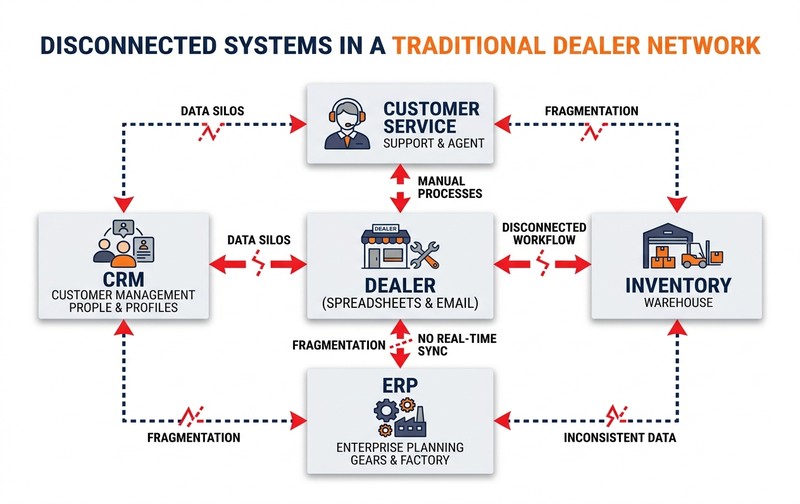
Fragmented systems and manual coordination create critical blind spots across orders, inventory, pricing, and field sales performance as dealer networks expand.
Dealer Data Becomes Fragmented Across Systems
Dealer information rarely remains in one place. A typical organization may have:
- Dealer master information in ERP
- Opportunities inside CRM
- Orders in ERP or another ordering platform
- Pricing maintained in spreadsheets
- Inventory information in warehouse systems
- Dealer communications in email or messaging apps
- Field-visit reports in spreadsheets
- Targets in separate sales reports
Management may therefore have data without having a reliable dealer 360-degree view.
A centralized dealer-management model brings relevant information together so sales, operations, finance, and leadership teams can work from consistent data.
Management Loses Real-Time Dealer Visibility
Dealer managers need more than month-end sales figures. They need to understand:
- Which dealers are active
- Which dealers are underperforming
- Current opportunities
- Pending orders
- Product demand
- Dealer inventory
- Target achievement
- Outstanding issues
- Field-sales activity
- Future pipeline
When this information arrives only through manually prepared reports, management decisions are based on historical rather than operational data.
Manual Processes Increase Delays and Errors
Dealer operations frequently involve repetitive coordination across teams and manual handoffs:
Dealer request ➔ Salesperson ➔ Regional manager ➔ Finance ➔ Operations ➔ ERP ➔ Dealer
When every step depends on emails or phone calls, simple transactions can become slow.
Automation can help standardize routing, approvals, notifications, dealer communication, and status visibility.
Network Growth Makes Existing Processes Hard to Scale
Adding more dealers should expand market reach. It should not require an equivalent increase in administrative effort.
A scalable dealer-management system therefore needs structured workflows, governed access, centralized data, integrations, self-service capabilities, and measurable performance.
Salesforce DMS and Its Role in Dealer Management
The term Salesforce DMS commonly refers to a dealer-management solution built around Salesforce capabilities rather than a single standardized Salesforce product.
The exact architecture depends on the organization’s industry, dealer model, ERP landscape, field-sales requirements, and commercial processes.
What Is Salesforce DMS?
A Salesforce DMS is a dealer-management environment built using Salesforce to centralize dealer relationships, sales activities, channel processes, performance data, collaboration, portals, analytics, and connected workflows.
Depending on the implementation, it may help manage:
The goal is not simply to digitize dealer records. It is to create greater control across the dealer lifecycle.
How a Salesforce-Based Dealer Management Model Works
A typical architecture connects front-office dealer relationship layers with back-office transactional engines:
Core Dealer Engagement Layer:
Manufacturer / Brand ➔ Salesforce ➔ Dealer Portal (Experience Cloud) ➔ Dealers / Distributors
Connected Backend Operational Layer:
ERP ➔ Inventory ➔ Finance ➔ Order Fulfilment ➔ Logistics ➔ Other Enterprise Systems
Salesforce becomes the relationship, workflow, engagement, analytics, or channel layer, while ERP continues to manage appropriate transactional and financial processes.
This distinction is important because effective dealer management usually depends on both front-office and back-office information.
CRM, PRM and Dealer Management Are Not the Same Thing
These systems have related but different purposes:
- CRM focuses primarily on customer and sales relationships.
- PRM (Partner Relationship Management) focuses on channel partners, resellers, distributors, and other business partners.
- Dealer Management extends further into processes that may include ordering, dealer inventory visibility, targets, territory activity, pricing, field visits, credit information, fulfilment, and performance management.
Salesforce Experience Cloud supports partner onboarding, lead distribution, deal registration, quoting, partner scorecards, channel sales management, and partner forecasting.
A Salesforce DMS architecture can combine these capabilities with integrations and dealer-specific workflows.
Core Dealer Management Challenges Salesforce Can Address
The value of a dealer-management platform becomes clearer when viewed against specific operational problems.
1. Limited Visibility Across Dealers and Territories
2. Slow and Manual Dealer Order Management
3. Poor Inventory and Product Availability Visibility
4. Inconsistent Pricing, Discounts and Commercial Policies
5. Weak Credit and Outstanding Visibility
6. Limited Field Sales Accountability
7. Dealer Performance Is Difficult to Measure
Essential Capabilities of a Modern Salesforce Dealer Management Solution
Every implementation will differ, but several capabilities commonly provide the foundation for effective dealer-network management.
Centralized Dealer 360-Degree View
A dealer profile should provide authorized users with a consolidated view of relevant information. This may include:
- Business details & contact hierarchy
- Locations, territory, and dealer classification
- Opportunities, orders, and sales history
- Service interactions and field activities
- Targets, performance scorecards, and outstanding issues
This eliminates dependency on scattered databases and manual reports.
Self-Service Dealer Portal
Dealers should not have to contact an account manager for every piece of information. A secure portal enables self-service activities such as:
- Viewing assigned leads and registering opportunities
- Accessing technical product documents and brochures
- Browsing product catalogs and submitting order requests
- Checking order fulfillment, delivery, and payment statuses
- Collaborating directly with brand account teams
Salesforce Experience Cloud supports partner users accessing securely shared CRM data through dedicated partner sites.
Lead Distribution and Opportunity Management
Manufacturers frequently generate leads that must be routed to dealers. A structured lifecycle ensures channel accountability:
Lead captured ➔ Dealer assigned ➔ Dealer accepts ➔ Opportunity progresses ➔ Outcome recorded
This improves visibility into whether channel-generated opportunities are actually being followed and converted.
Order and Fulfilment Visibility
Dealers often want answers to three fundamental questions: Was my order accepted? When will it be processed? What is the current delivery status?
Integrating Salesforce with ERP allows selected order and fulfilment information to flow back into the dealer-management environment without delay.
Inventory and Product Visibility
Inventory visibility enables dealers and sales teams to make reliable commitments. Depending on architecture, this involves:
- Available stock and product catalogues
- Location-specific availability across regional hubs
- Dealer inventory vs warehouse inventory levels
- Stock movement, returns, and transfer tracking
The system of record should remain clearly defined to prevent contradictory inventory figures.
Dealer Target and Performance Tracking
Targets must be measurable against actual results. Dynamic dashboards compare Target vs Actual segmented by:
- Dealer and territory
- Region and sales representative
- Product and product category
- Specified time period (monthly, quarterly, annual)
This helps managers prioritize intervention rather than reviewing every dealer manually.
Field Sales and Dealer Visit Management
Dealer visits become structured business activities rather than informal meetings.
Salesforce’s Partner Visit Management supports visit planning, assigned tasks, metric capture, and comparison of expected versus actual KPIs directly on mobile devices.
Forecasting and Demand Visibility
Dealer pipeline and historical activity provide crucial demand signals.
By combining dealer opportunities, sales agreements, order patterns, targets, and market trends, organizations build more structured, accurate forecasting processes.
How the Dealer Management Workflow Works End to End
An effective Salesforce DMS connects individual processes into an automated continuum rather than creating another isolated application:
➔
➔
➔
➔
➔
➔
➔
Step 1: Dealer Onboarding
The organization captures dealer information and completes validation and approval workflows. The dealer is then categorized based on territory, hierarchy, products, or business model.
Step 2: Lead and Opportunity Assignment
Leads are assigned according to geography, product, dealer tier, capacity, specialization, or customer relationship. The brand retains end-to-end progress visibility rather than losing tracking after handover.
Step 3: Product and Inventory Visibility
Authorized dealers access real-time product catalogs, pricing tiers, specifications, and availability data directly from integrated ERP feeds.
Step 4: Order or Sales Request Creation
The dealer or field sales representative initiates an order request or commercial quotation through the self-service Experience Cloud portal.
Step 5: Pricing, Credit and Approval Validation
Transactions automatically validate against established pricing lists, discount limits, dealer credit standing, and commercial policies before approval routing.
Step 6: ERP Processing and Fulfilment
Once approved, transaction data transfers smoothly to the ERP backend for order booking, pick-pack-ship processing, invoicing, and logistics coordination.
Step 7: Delivery and Status Updates
Fulfillment updates, dispatch tracking, invoice generation, and shipment milestones synchronize back to Salesforce, keeping partners informed without manual queries.
Step 8: Performance and Forecast Analysis
The brand analyzes the entire cycle: Dealer activity ➔ Opportunity ➔ Order ➔ Fulfilment ➔ Revenue ➔ Performance. This provides comprehensive visibility rather than relying only on monthly revenue numbers.
Salesforce DMS Integration With ERP and Business Systems
Dealer management should not become another data silo. For many organizations, integration determines whether the solution creates operational value.
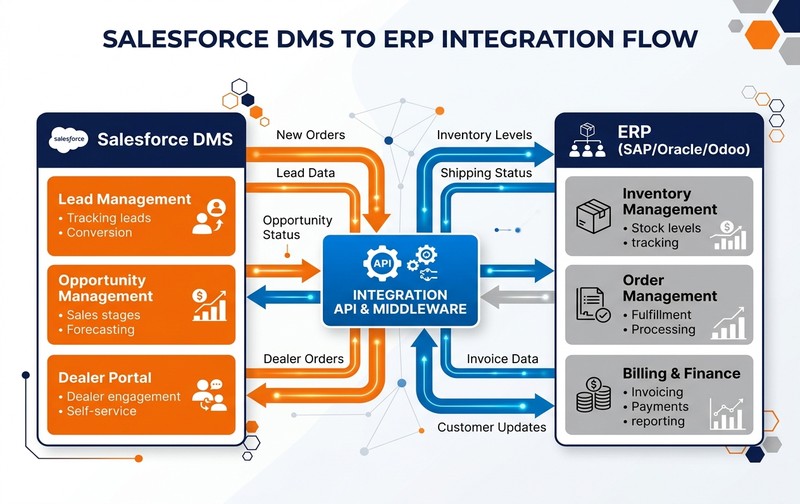
Unified data architecture: Aligning front-office dealer relationship workflows in Salesforce with transactional ERP backbones for inventory, credit, and order fulfilment.
Why CRM and ERP Data Must Stay Connected
Salesforce and ERP typically answer different but mutually dependent business questions:
Salesforce Answers:
Who is the dealer? What opportunities are active? What is the relationship status? What field activity is happening? What is the future demand forecast?
ERP Answers:
What was ordered? What inventory is available? What has been delivered? What is invoiced? What credit is outstanding? What payments are settled?
Dealer-facing teams need information from both environments to operate efficiently.
Typical Data Shared Between Salesforce and ERP
| Data Entity | Typical Direction & Source of Truth |
|---|---|
| Dealer master | ERP ↔ Salesforce (Bi-directional) |
| Products & Catalogs | ERP → Salesforce |
| Pricing & Discount Rules | ERP → Salesforce |
| Inventory & Stock Levels | ERP → Salesforce |
| Sales Orders & Requests | Salesforce → ERP |
| Order Status & Milestones | ERP → Salesforce |
| Delivery & Shipment Status | ERP → Salesforce |
| Invoices & Billing Records | ERP → Salesforce |
| Credit limits & Overdue status | ERP → Salesforce |
| Payments & Receipts | ERP → Salesforce |
The exact source of truth should be defined during solution design.
Real-Time vs Scheduled Integration
Not every piece of information requires real-time synchronization. Inventory availability and order submissions may require immediate updates, whereas historical invoice records or monthly target recalculations tolerate scheduled batch synchronization.
Businesses should classify integration requirements based on operational urgency instead of treating everything as real time.
SAP and Other ERP Integration Considerations
Salesforce can be integrated with SAP and other ERP platforms through appropriate integration architecture, middleware, APIs, or integration services. Before implementation, organizations should define:
- Source systems and master-data ownership
- API requirements and integration middleware
- Integration frequency (event-driven vs scheduled)
- Error handling, logging, and retry logic
- Security protocols and credential management
- Duplicate prevention and data reconciliation
Integration architecture should be designed before complex dealer workflows are developed.
Dealer Management KPIs That Leadership Should Track
A Dealer Management System becomes strategically useful when it translates operational data into measurable performance.
| Strategic KPI | Core Business Question Answered |
|---|---|
| Dealer sales achievement | Are dealers meeting agreed monthly and quarterly targets? |
| Lead conversion rate | Are brand-assigned opportunities converting into closed business? |
| Order frequency | How actively and consistently is each dealer placing orders? |
| Average order value (AOV) | What is the commercial size and profitability of dealer transactions? |
| Inventory movement | Is channel stock moving efficiently without stagnation or stockouts? |
| Outstanding receivables | Is financial exposure increasing beyond approved credit terms? |
| Dealer visit compliance | Are required field representative audits and visits occurring on schedule? |
| Pipeline coverage | Is future revenue sufficiently supported across channel opportunities? |
| Dealer growth rate | Which dealers and territories are expanding or losing momentum? |
| Forecast accuracy | How reliable is expected demand compared to actual orders? |
Organizations should avoid creating dozens of dashboards simply because data exists.
KPIs should answer specific management questions and support clear, decisive action.
Business Benefits of Centralized Dealer Management
A Salesforce DMS initiative should be evaluated by business outcomes rather than software features alone:
Better Dealer Visibility
Leadership gains a consistent view of dealer activities, opportunities, performance, and issues.
Faster Decision-Making
Managers spend less time collecting data and more time responding proactively to exceptions.
Consistent Processes
Common workflows reduce process variation across regions, sales teams, and dealer groups.
Improved Forecasting
Pipeline and dealer activity contribute directly to structured demand and revenue forecasting.
Stronger Engagement
Self-service tools reduce unnecessary back-and-forth between dealers and internal teams.
Reduced Admin Effort
Automation reduces repetitive manual reporting, approvals, follow-ups, and data entry.
Easier Expansion
Structured onboarding and permissions make it easier to add new dealers without reinventing processes.
Industries That Benefit From Salesforce-Based Dealer Management
Dealer-management requirements are especially relevant in industries where indirect sales channels contribute significantly to revenue:
Salesforce specifically supports distributor and partner processes within industry offerings such as Manufacturing Cloud, including visit management, inventory-related capabilities, and partner-performance workflows.
The exact DMS model should still be designed around the industry’s specific commercial structure.
Salesforce DMS Implementation and Architecture Considerations
Technology selection is only one part of implementation. Dealer-management projects can underperform when organizations configure software before understanding the business process.
1. Define Dealer Processes Before Configuration
Document current and desired flows for dealer onboarding, leads, opportunities, orders, pricing, approvals, inventory visibility, visits, service, and reporting. Identify process bottlenecks and gaps before automation begins.
2. Identify the Right Salesforce Products and Licenses
Determine whether you need standard CRM, Experience Cloud, PRM features, Manufacturing Cloud, Automotive Cloud, integration capabilities, or custom development. Do not select licenses from a feature checklist—map them to actual user roles and workflows.
3. Design Dealer Roles and Data Access
Different personas require tailored visibility: dealer principals, sales managers, distributor reps, regional managers, and internal sales teams. Access models must enforce data governance and territorial privacy.
4. Map ERP and Integration Requirements Early
Identify clearly: What originates in Salesforce? What originates in ERP? What must synchronize? How quickly must synchronization occur? This avoids conflicting data sources.
5. Clean Dealer and Product Master Data
Migrating poor data into a modern platform perpetuates operational failures. Resolve duplicate accounts, obsolete items, incorrect territory assignments, and incomplete contact information prior to migration.
6. Define Reports and KPIs Before Go-Live
Design management dashboards around specific commercial decisions rather than generic operational charts. Ensure teams know how performance is tracked.
7. Plan Dealer Adoption and Training
Even an exceptional portal fails if partners avoid using it. Explain why workflows are evolving, highlight partner benefits, set adoption expectations, and offer hands-on enablement.
8. Start With a Controlled Pilot
Validate workflows, integrations, permissions, reporting, and portal experience with a select dealer group before executing a nationwide rollout.
Common Mistakes When Implementing Dealer Management on Salesforce
The difference between a high-adoption DMS and an underused platform comes down to implementation choices:
Evaluating Whether Salesforce DMS Fits Your Dealer Network
Salesforce-based dealer management becomes particularly relevant when network complexity starts exceeding the organization’s current systems and processes. Evaluate the following key diagnostic questions:
- How many active dealers do you manage?
- How many countries or territories are involved?
- Do you operate multi-tier distribution?
- Are dealer records fragmented?
- Can management see dealer pipeline in real time?
- Can dealers access order information without contacting internal teams?
- Is inventory visibility reliable?
- Are pricing and discounts governed?
- Are field visits measurable?
- Can dealer targets be compared with actual performance?
- Is ERP connected to dealer-facing processes?
- Can leadership identify underperforming dealers quickly?
- Can the current system support another 100 or 500 dealers?
If several answers indicate gaps, dealer management may have become a systems problem rather than simply a sales-management problem.
Salesforce-based dealer management is most relevant when dealer operations have outgrown spreadsheets, disconnected applications, manual reporting, and fragmented portals—and the organization needs CRM, partner workflows, analytics, and dealer collaboration connected to wider enterprise systems.
Building a Scalable Dealer Management Model With Salesforce
Dealer networks create growth only when businesses can maintain visibility and control as the network expands. That requires more than collecting dealer contact information.
The Scalable Channel Operating Continuum:
Dealer Visibility ➔ Process Control ➔ Collaboration ➔ Integration ➔ Performance ➔ Scale
A well-designed Salesforce DMS can help centralize dealer relationships, improve process consistency, provide self-service capabilities, strengthen field-sales visibility, connect partner workflows with ERP information, and give leadership clearer performance data.
However, the technology architecture should follow the business model. Before implementing dealer management on Salesforce, define which processes belong in CRM, which remain in ERP, which users require portal access, how data should synchronize, and which metrics management actually needs.
The goal is not simply to implement another system. The goal is to build a dealer network that can grow without creating equivalent operational complexity.
Frequently Asked Questions About Salesforce DMS
Ready to Improve Dealer Visibility and Control?
If dealer information is fragmented across spreadsheets, ERP systems, emails, portals, and manual reports, adding more dealers can increase complexity instead of creating scalable growth.
Emerging Alliance can help assess your dealer-management processes, identify visibility and integration gaps, and determine how Salesforce can support a more connected dealer network.
Book a Salesforce DMS Demo