QR Code Manufacturing: Improve Production Tracking and Supply Chain Traceability
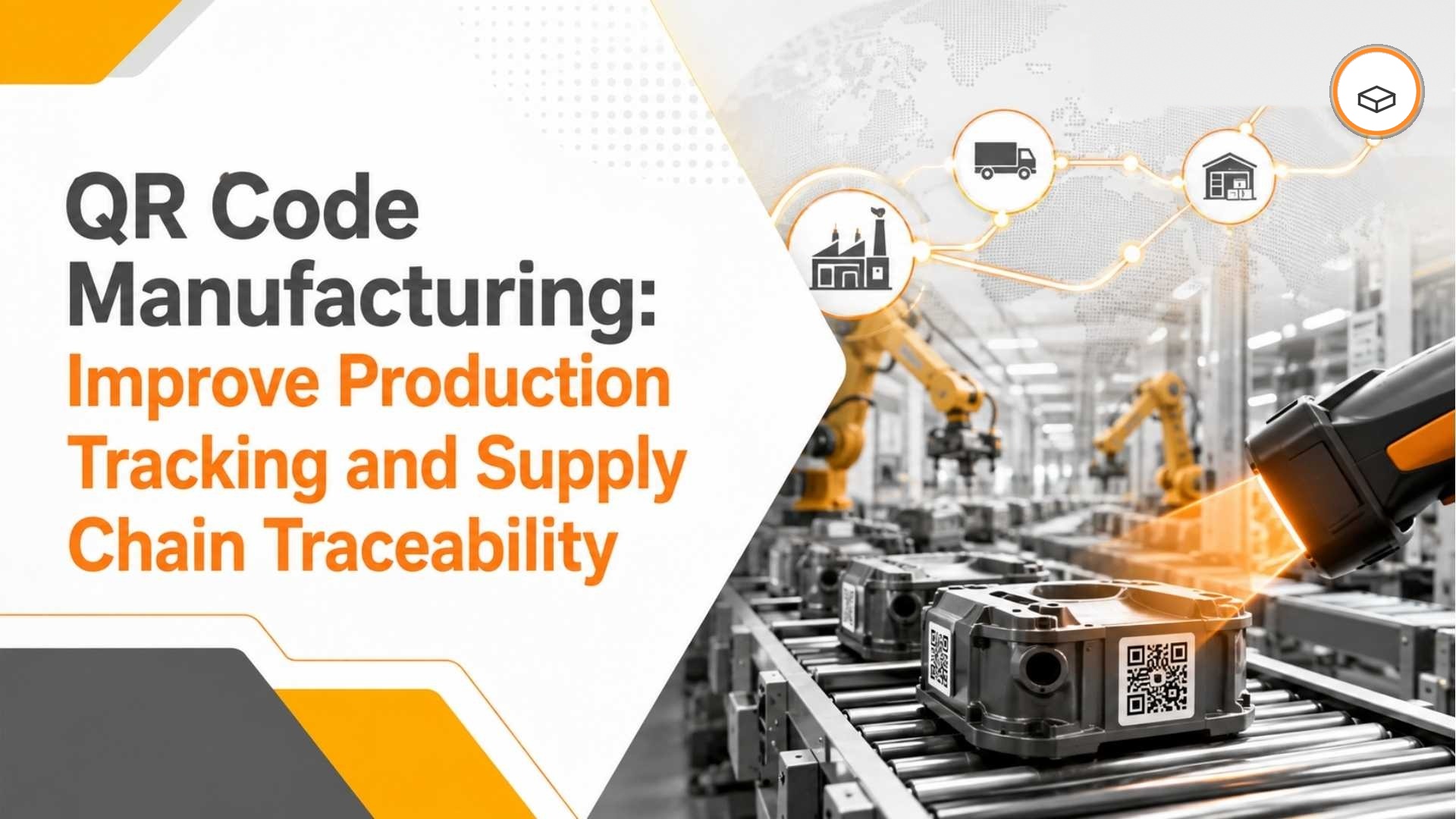
QR Code Manufacturing: Improve Production Tracking and Supply Chain Traceability
Quick Answer
QR code manufacturing uses scannable QR codes to identify raw materials, components, work-in-progress, finished goods, batches, warehouse locations, production orders, equipment, and other manufacturing assets.
When QR scanning is integrated with an ERP environment, manufacturers can reduce repeated manual data entry, improve material identification, strengthen production traceability, increase inventory visibility, and capture operational information closer to where physical activity occurs.
For businesses using SAP Business One, QR/barcode-enabled workflows can be designed around relevant inventory, warehouse, production, batch, serial-number, and item-management processes.
The real value is not simply scanning a QR code. It is creating a reliable digital connection between physical manufacturing activity and accurate ERP data.
What Is QR Code Manufacturing?
QR code manufacturing is the use of QR codes as an identification and data-capture layer across manufacturing operations.
Manufacturers can associate QR codes with physical materials, products, orders, locations, or assets so employees can identify the correct digital record by scanning rather than repeatedly entering information manually.
QR codes can be associated with:
Raw materials
Components
Work-in-progress items
Finished products
Production orders
Batches and lots
Serial numbers
Warehouse locations
Pallets and containers
Machines
Tools
Inspection records
Maintenance information
Product documentation
A scan identifies or retrieves the corresponding digital record, while the connected ERP, manufacturing, warehouse, or quality system determines what happens next.
Why QR Codes Matter in Manufacturing
Manufacturing generates a continuous stream of operational transactions.
If these activities are recorded manually, manufacturers can face problems such as:
QR codes can simplify the point at which the correct item, batch, order, location, or asset is identified.
Instead of repeatedly typing item codes or searching manually for records, an employee can scan the relevant code and continue the required process in the connected system.
This becomes particularly valuable for manufacturers operating with high inventory volumes, multiple warehouses, frequent material movements, batch-controlled products, serialised items, or complex production workflows.
How QR Code Production Tracking Works
QR code production tracking connects physical production events with digital manufacturing records.
A typical workflow might look like:
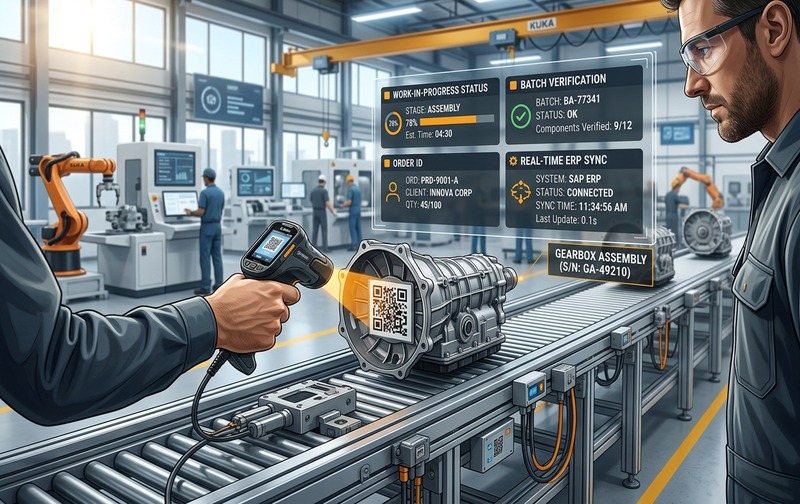
QR Code Production Tracking: Handheld scanning connects physical shop-floor assembly events directly to ERP work orders, batch validation, and WIP records.
QR codes can be used at selected checkpoints to identify the material, item, production order, batch, location, or finished product involved.
1. Raw Material Identification
When materials arrive, warehouse personnel can scan the corresponding QR code to identify the item and verify the relevant digital record.
This can reduce dependence on manually reading or entering long material codes.
2. Material Issue to Production
Before production begins, employees can scan the required component or raw material.
The workflow can then help verify whether the selected material corresponds to the intended item, batch, production requirement, or transaction.
3. Work-in-Progress Tracking
WIP items can be identified as they move between manufacturing stages.
A QR scan at defined checkpoints can help create more timely visibility into where an order or item currently sits within the manufacturing process.
4. Finished Production
When production is completed, the finished product can be identified and associated with the relevant production process or transaction.
5. Finished Goods Movement
The finished product can then be identified during warehouse receipt, movement, picking, packing, or dispatch.
When these checkpoints are connected to the underlying manufacturing and ERP system, production activity becomes easier to trace digitally.
QR Code Production Tracking at a Glance
| Manufacturing Stage | QR Code Can Identify | Potential System Process |
|---|---|---|
| Receiving | Material, item, batch | Goods receipt and identification |
| Material issue | Component, batch, production order | Production material issue |
| Work-in-progress | Order, item, stage | Production checkpoint |
| Quality inspection | Product, batch, inspection record | Quality information |
| Finished production | Product, batch or serial | Finished-goods receipt |
| Warehouse | Item, pallet, location | Transfer, picking or counting |
| Dispatch | Product, batch, order | Shipment identification |
The exact transactions depend on the manufacturer’s process design, ERP configuration, scanners, devices, applications, and integration architecture.
QR Code Manufacturing for Raw Material Tracking
Raw material identification is one of the most valuable applications of QR codes in manufacturing.
Manufacturers can manage hundreds or thousands of raw materials across warehouses, racks, bins, production areas, or plants.
As inventory volumes increase, manual identification becomes more difficult.
A QR-enabled process can help employees identify raw materials during:
When the scan is connected to the appropriate ERP record, employees can access information needed to answer questions such as:
What material is this?
Which item code does it correspond to?
Which batch is associated with it?
Where should it be stored?
What quantity does the ERP currently show?
Which production order requires it?
Has the material already been issued?
Does the selected material match the intended transaction?
This is particularly useful in manufacturing environments where similar-looking materials, large SKU volumes, or batch-controlled inventory increase the risk of identification errors.
QR Code Inventory Tracking in Manufacturing
Inventory accuracy directly affects purchasing, production planning, material availability, customer fulfilment, and working capital.
If ERP inventory does not match physical stock, planners and operations teams may make decisions using incorrect information.
QR code inventory tracking can reduce repeated manual identification and data-entry steps during inventory transactions.
Employees can potentially use scanning during:
The important point is that scanning should not become a disconnected activity.
The QR code should identify the correct item, location, batch, serial number, or transaction and then connect that information with the relevant business process.
When properly designed, this creates a stronger relationship between physical inventory and ERP inventory records.
QR Code Supply Chain Tracking in Manufacturing
Manufacturing supply chains extend well beyond the shop floor.
Materials move through several handoff points:
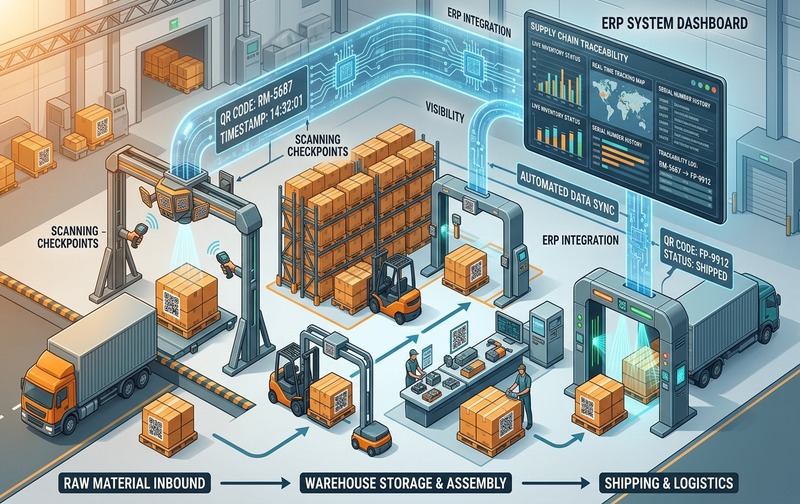
QR Code Supply Chain Traceability: Connecting inbound supplier receiving, warehouse inventory staging, and outbound logistics to real-time ERP analytics.
Each handoff creates an opportunity for information to become delayed, incomplete, or incorrectly recorded.
QR codes can provide a consistent identification mechanism across these stages.
Inbound Material Tracking
During receiving, QR codes can help identify:
- Materials
- Supplier items
- Product information
- Batches
- Serial numbers
- Purchase-related items
- Pallets or containers
This can make the identification process faster and reduce repeated manual entry.
Internal Warehouse and Production Movement
Materials may move between warehouses, storage locations, staging areas, production departments, or work centres before they become finished products.
Scanning can help identify what is moving and support the appropriate digital transaction.
Outbound Product Tracking
Finished products can be identified during:
- Picking
- Packing
- Staging
- Loading
- Dispatch
This improves the connection between the physical product being shipped and the digital transaction associated with it.
QR Code Traceability in Manufacturing
Traceability becomes business-critical when manufacturers need to understand the history and movement of a material, batch, serialised item, or finished product.
This is particularly important in industries such as:
QR codes can act as a quick identification mechanism connecting a physical item with the relevant digital records.
Manufacturing traceability may involve:
- Raw material identification
- Supplier information
- Batch or lot details
- Serial numbers
- Production orders
- Work-in-progress stages
- Quality information
- Finished products
- Warehouse locations
- Dispatch information
However, an important distinction is necessary:
A QR code does not create complete traceability by itself.
True manufacturing traceability depends on the relationship between identification, transaction history, batch or serial records, process discipline, and the underlying ERP system.
The QR code makes identification easier.
The ERP and business process provide the transaction history.
QR Codes for Work-in-Progress Tracking
Work-in-progress is often one of the least visible areas of manufacturing.
A production order may pass through several processes before it becomes a finished product.
For example:
Without structured checkpoints, managers may struggle to determine:
- Where WIP currently is
- Which stage has been completed
- Which operation is delayed
- Which materials were consumed
- Whether the product is ready for the next activity
- Whether the production order is progressing as expected
A QR code associated with the relevant WIP item or production record can be scanned at selected checkpoints.
When the scanning workflow connects to the underlying manufacturing or ERP process, operational teams can gain more timely production information.
The objective is not to introduce a scan at every possible activity.
It is to place scanning at the points where better identification and data capture create measurable operational value.
QR Codes for Warehouse Operations
Manufacturing performance depends heavily on warehouse accuracy.
Materials and finished goods continuously move between:
- Receiving areas
- Storage locations
- Production staging areas
- Warehouses
- Picking zones
- Dispatch areas
QR codes can be applied to:
Employees can use scanning during receiving, put-away, transfer, picking, stock counting, and dispatch activities.
A properly designed QR workflow can reduce the need to manually enter item identifiers and help employees identify the intended inventory faster.
This can be especially useful in high-volume warehouses where small identification mistakes can create larger downstream problems.
QR Codes for Quality Control
Quality processes require a reliable connection between inspection activity and the item, batch, or production process being inspected.
QR codes can simplify that identification step.
A typical process may look like:
Depending on the connected quality-management or ERP workflow, QR codes can help identify or retrieve:
- Product specifications
- Inspection information
- Batch details
- Production information
- Quality documents
- Defect records
- Corrective-action records
However, QR codes should not be treated as the quality-management system itself.
The effectiveness of the workflow depends on how the identification process connects to the organisation’s quality procedures, data structure, ERP configuration, and other quality applications.
QR Codes for Equipment and Asset Tracking
QR codes are not limited to inventory.
Manufacturers can also use them as identification mechanisms for:
- Machines
- Tools
- Measuring instruments
- Production equipment
- Maintenance assets
- Inspection equipment
A unique QR code can connect the physical asset with information such as:
- Asset identification
- Maintenance history
- Service records
- Calibration information
- Operating instructions
- Inspection records
This allows employees to access the relevant information at the point where the equipment is being used.
For organisations managing large numbers of tools or manufacturing assets, QR identification can complement existing maintenance and asset-management processes.
How QR Code Manufacturing Can Work With SAP Business One
The biggest opportunity for SAP Business One manufacturers is not simply creating QR labels.
It is connecting identification with the ERP processes that manage inventory and manufacturing data.
SAP Business One provides functionality around areas including:
A QR/barcode-enabled manufacturing workflow can therefore be designed around the organisation’s SAP Business One environment.
A typical architecture may look like:
For example, a worker may scan a component before issuing it to production.
The workflow could use that scan to:
- Identify the item.
- Identify the batch or other relevant data.
- Validate the selected material.
- Associate it with the appropriate ERP transaction.
- Record the business activity.
- Make updated information available to authorised users.
The exact implementation depends on:
This is why manufacturers should evaluate QR code projects as ERP process-design projects, not merely label-printing projects.
QR Code Manufacturing vs Manual Tracking
The difference is not simply QR code versus paper.
The real difference is between repeated manual identification and a more connected data-capture process.
| Manual Tracking | QR Code-Based Tracking |
|---|---|
| Manual item identification | Scannable identification |
| Repeated typing of item information | Faster data capture |
| Higher opportunity for entry errors | Reduced manual identification |
| Paper records may be required | Digital records can be retrieved |
| Manual WIP tracking can be difficult | Better checkpoint visibility |
| Slower inventory counting | Faster item identification |
| Information may be updated later | Data can be captured closer to the activity |
QR codes do not automatically eliminate manufacturing problems.
Process design, master data, integration, employee adoption, scanning devices, labels, and ERP configuration all determine the final result.
Key Benefits of QR Code Manufacturing
When implemented around the right manufacturing processes, QR code manufacturing can deliver several operational advantages.
Faster Identification and Data Capture
Scanning is often faster than manually searching for or entering long material and item identifiers.
Fewer Manual-Entry Opportunities
Reducing repeated manual input can lower the opportunity for incorrect item identification and transcription errors.
Better Inventory Control
QR-enabled transactions can help create a closer connection between physical inventory activity and system records.
Improved WIP Visibility
Scanning at carefully selected production checkpoints can help operations teams understand where work-in-progress currently sits.
Stronger Traceability
QR identification can connect materials and finished products with batch, serial, production, warehouse, and other relevant digital records.
Faster Warehouse Execution
Scanning can support more efficient identification during receiving, transfer, picking, stock counting, and dispatch.
Reduced Paper Dependency
Digital identification can reduce dependence on manually maintained paper records where the business process allows.
More Timely Operational Information
When scanning feeds properly designed ERP transactions, managers can access information closer to the time when operational activity occurs.
Common QR Code Manufacturing Challenges
QR code projects can fail when manufacturers focus on labels before solving the underlying business process.
1. Poor Master Data
Incorrect item, batch, warehouse, or product data will remain incorrect even after scanning is introduced.
The master-data foundation must be reliable.
2. Inconsistent Labeling
QR codes must consistently identify the intended item, batch, asset, or process.
Poor label governance can create confusion.
3. Damaged or Unreadable QR Codes
Manufacturing environments may expose labels to:
Label material, print quality, contrast, size, placement, and environmental durability should therefore be considered during implementation.
4. No ERP Integration
If employees scan data into one application and then manually enter the same information into the ERP system, the organisation has not eliminated duplicate work.
It may simply have created another disconnected layer.
5. Excessive Scanning
Not every manufacturing activity needs a QR scan.
Too many checkpoints can create unnecessary steps and reduce adoption.
Scanning should be introduced where it improves identification, control, traceability, or data capture.
6. Poor Employee Adoption
Shop-floor processes must be simple.
Employees need to understand:
- What to scan
- When to scan
- Why the scan is required
- What to do when the scan fails
- How to handle damaged labels
- How to correct errors
7. Hardware and Network Limitations
Implementation should consider:
- Handheld scanners
- Mobile devices
- Industrial devices
- Label printers
- Wireless coverage
- Battery life
- Device durability
- Application response time
The technology must work reliably in the actual manufacturing environment.
How to Implement QR Code Manufacturing Successfully
A successful QR code manufacturing initiative should begin with operational problems, not technology.
Step 1: Identify the Business Problem
Determine what you are trying to improve.
Common priorities include:
Avoid starting with the assumption that QR codes should be used everywhere.
Step 2: Establish Current Performance
Measure the existing process before introducing automation.
Useful KPIs can include:
Without a baseline, it becomes difficult to prove whether the project improved the process.
Step 3: Map the Physical Workflow
Document how materials and products move through:
Identify where incorrect identification, manual work, or information delays occur.
Step 4: Define What the QR Code Identifies
Determine whether the QR code represents:
A QR code does not necessarily need to contain every piece of business information.
In many cases, it can contain or reference a unique identifier that allows the connected system to retrieve the current record.
Step 5: Design the ERP Workflow
Define what should happen after the scan.
For example:
This is where most of the business value is created.
Step 6: Pilot the Process
Start with a controlled process involving a limited number of:
Identify usability and integration problems before scaling.
Step 7: Measure Results
Compare the new process against the original KPI baseline.
Look for measurable changes in:
Step 8: Scale Gradually
Once the workflow is reliable, expand it across additional warehouses, products, production lines, or business units.
Scaling gradually reduces implementation risk and allows the organisation to standardise the process before wider deployment.
Why ERP Integration Determines the Value of QR Code Manufacturing
A QR code by itself is an identification mechanism.
The ERP system determines what happens after that identification.
Consider two scenarios.
Scenario 1: Disconnected Scanning
In the first scenario, an employee scans a component and only sees a code.
The organisation still needs to manually search for the item, verify the transaction, and enter information elsewhere.
The business value is limited.
Scenario 2: Connected ERP Workflow
In the second scenario, the employee scans the component and the connected workflow:
- Identifies the item.
- Retrieves the correct record.
- Validates the required information.
- Associates it with the intended business process.
- Updates the relevant ERP transaction.
The second scenario creates significantly more operational value.
For this reason, manufacturers should evaluate QR code manufacturing as part of their broader ERP, automation, and process-digitisation strategy.
Is QR Code Manufacturing Right for Your Business?
QR code manufacturing can be particularly useful for businesses dealing with:
However, QR codes are not automatically the best identification technology for every manufacturing requirement.
The appropriate solution depends on:
- Data requirements
- Scan distance
- Operating environment
- Label durability
- Transaction volume
- Manufacturing process
- Device requirements
- ERP architecture
- Automation objectives
For some processes, traditional barcodes may be sufficient.
For other use cases, RFID or different identification technologies may be worth evaluating.
The technology should follow the operational requirement—not the other way around.
How Emerging Alliance Can Help With SAP Business One and QR-Based Manufacturing
Manufacturers looking to improve inventory control, production visibility, warehouse movement, and traceability need more than QR labels.
They need a connected operating process.
Emerging Alliance helps businesses evaluate SAP Business One processes and identify where QR/barcode-enabled workflows can improve manufacturing operations.
Relevant areas can include:
The objective is to connect scanning, ERP data, manufacturing transactions, operational controls, and reporting rather than creating another standalone system.
Final Takeaway
QR code manufacturing is not simply about replacing conventional labels with QR codes.
The bigger opportunity is to connect physical manufacturing activity with accurate digital business information.
From raw-material receiving and inventory movement to production tracking, WIP visibility, warehouse operations, quality processes, batch traceability, and finished-goods dispatch, QR codes can provide a practical identification layer across manufacturing operations.
But identification is only the first step.
The greatest value comes when scanning connects with the ERP processes responsible for validating, processing, and recording the underlying business activity.
For manufacturers using SAP Business One, that means evaluating QR/barcode automation as part of the wider ERP and manufacturing-process architecture.
The goal is not to scan more.
The goal is to capture the right manufacturing information, at the right operational point, and connect it to the right ERP process.