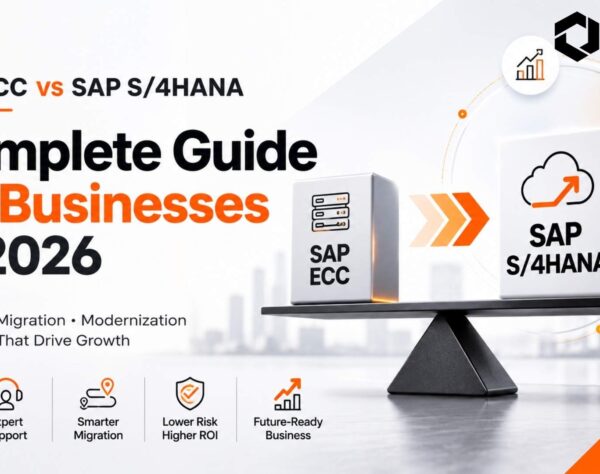
SAP ECC to S/4HANA Migration: Strategy, Costs, Steps & Cloud Planning
Moving from SAP ECC to SAP S/4HANA is no longer simply a technical upgrade decision.
For many organizations, it is a broader transformation decision involving business processes, historical data, custom code, integrations, infrastructure, cloud strategy, operating models and long-term SAP architecture.
SAP currently provides mainstream maintenance for applicable SAP Business Suite 7 core applications through the end of 2027, followed by optional extended maintenance through the end of 2030. This gives businesses a defined planning window, but it does not make migration simple.
A poorly planned SAP ECC to S/4HANA migration can create unexpected remediation work, extended testing cycles, integration issues, unnecessary data movement and expanding project scope.
A well-planned migration starts differently. It establishes the business case, evaluates the current ECC landscape, chooses the right migration approach and identifies cost and complexity before execution begins.
This guide explains how to build that roadmap.
Quick Answer: What Is SAP ECC to S/4HANA Migration?
SAP ECC to S/4HANA migration is the transition of an existing SAP ERP Central Component environment to SAP S/4HANA using system conversion, new implementation or selective data transition.
The migration can involve process redesign, data cleansing and transfer, custom-code remediation, integration changes, testing, infrastructure or cloud decisions, cutover planning and post-go-live stabilization.
The right migration strategy depends on how much of the existing ECC environment the organization wants to retain, redesign or selectively transform.
Why SAP ECC to S/4HANA Migration Planning Matters Before 2027
The maintenance timeline is one reason organizations are accelerating S/4HANA planning, but it should not be the only reason.
SAP states that mainstream maintenance for qualifying Business Suite 7 core applications runs until the end of 2027. Organizations requiring additional transition time may choose optional extended maintenance through 2030.
That does not mean every organization should rush into implementation.
It means organizations still running ECC need enough time to answer important questions before committing to the migration programme.
They need to understand:
The closer organizations move toward the end of mainstream maintenance without resolving these questions, the more likely migration becomes a deadline-driven technical programme rather than a controlled business transformation.
The objective should therefore be migration readiness before migration execution.
SAP ECC to S/4HANA Migration Approaches: Brownfield, Greenfield or Selective Data Transition?
One of the most important decisions is determining how much of the existing ECC environment should move forward.
There are three major transition approaches.
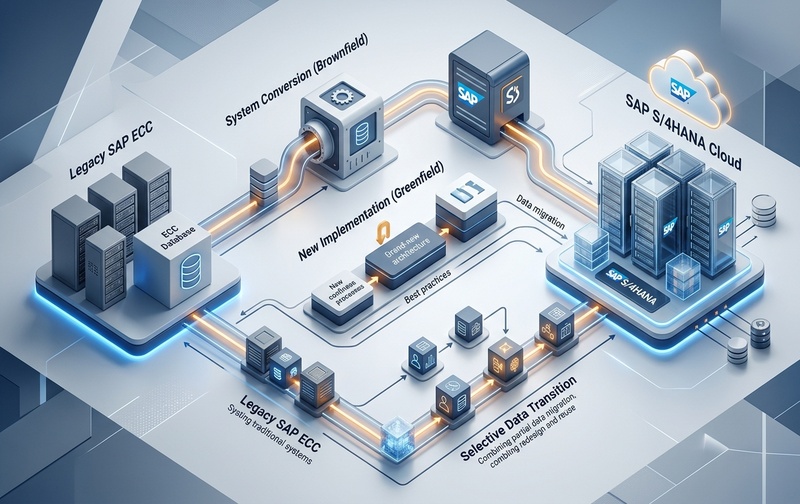
Comparing SAP ECC to S/4HANA migration approaches: Brownfield (System Conversion), Greenfield (New Implementation), and Selective Data Transition pathways.
1. Brownfield Migration or System Conversion
A brownfield approach converts the existing ECC environment into SAP S/4HANA while retaining much of the existing configuration, processes and data.
It can make sense when:
Brownfield does not mean “no change.”
Simplification requirements, custom-code compatibility, obsolete functionality, integrations, data structures and technical dependencies still need assessment.
2. Greenfield Migration or New Implementation
Greenfield implementation creates a new SAP S/4HANA environment instead of converting the current ECC system directly.
It can suit organizations that want to:
Greenfield provides greater transformation flexibility but can require more business redesign, data-selection decisions, user involvement and change management.
3. Selective Data Transition
Selective Data Transition sits between full system conversion and a completely new implementation.
SAP describes it as an approach that allows organizations to selectively transfer data and processes to SAP S/4HANA. Depending on the scenario, businesses can leave certain historical data or obsolete organizational structures behind while retaining selected processes and investments.
It can be useful when the organization wants to:
SAP notes that Selective Data Transition supports SAP S/4HANA and SAP S/4HANA Cloud Private Edition scenarios, while direct Selective Data Transition into Public Cloud is not supported.
Brownfield vs Greenfield vs Selective Data Transition
| Decision Area | Brownfield | Greenfield | Selective Data Transition |
|---|---|---|---|
| Existing processes | Mostly retained | Redesigned | Selectively retained |
| Historical data | Broadly retained | Selected data migrated | Selectively migrated |
| Existing configuration | Largely reused | Rebuilt | Selectively reused |
| Transformation scope | Lower | Higher | Flexible |
| Legacy complexity | More likely to remain | Greater opportunity to remove | Can be selectively reduced |
| Best suited to | Stable ECC environments | Major ERP transformation | Mixed transformation requirements |
There is no universally correct migration approach.
The better choice is the one aligned with the organization’s process maturity, data requirements, technical landscape, transformation objectives and risk tolerance.
SAP S/4HANA Cloud Roadmap: Public Cloud, Private Cloud or On-Premises?
Migration approach and deployment model are related decisions, but they are not the same decision.
Organizations also need to determine where and how SAP S/4HANA will operate.
SAP S/4HANA Cloud Public Edition
Public Edition emphasizes standardization and cloud operating principles.
It is generally more aligned with organizations willing to adopt standardized processes and limit deep modifications.
The key question becomes:
How much of our existing ECC design should we replicate—and how much should we replace with standardized processes?
If the answer is “almost everything must remain exactly as it is,” Public Cloud may require more business-process reconsideration.
SAP S/4HANA Cloud Private Edition
Private Edition can provide greater flexibility for organizations with complex existing SAP environments, industry-specific requirements or significant transformation dependencies.
It can be relevant where the business wants cloud delivery while retaining greater control over the transition path and system configuration.
SAP S/4HANA On-Premises
On-premises deployment can remain relevant where organizations have specific infrastructure, regulatory, operational or architectural requirements.
The deployment decision should therefore consider:
Do not choose deployment architecture only because it appears to offer the lowest immediate technical effort.
The better question is:
Which architecture supports the operating model we expect to run for the next several years?
SAP ECC to S/4HANA Migration Readiness Assessment
Migration planning should begin with evidence about the existing environment.
A readiness assessment creates that evidence.
System landscape
Verify:
Business processes
Identify:
Data landscape
Review:
Custom code
Identify:
Integrations
Document interfaces with:
This assessment creates the baseline required for realistic decisions about scope, timeline, architecture and budget.
SAP S/4HANA Migration Steps: From Assessment to Go-Live
Although every programme differs, a structured SAP ECC to S/4HANA migration process normally includes several major stages.
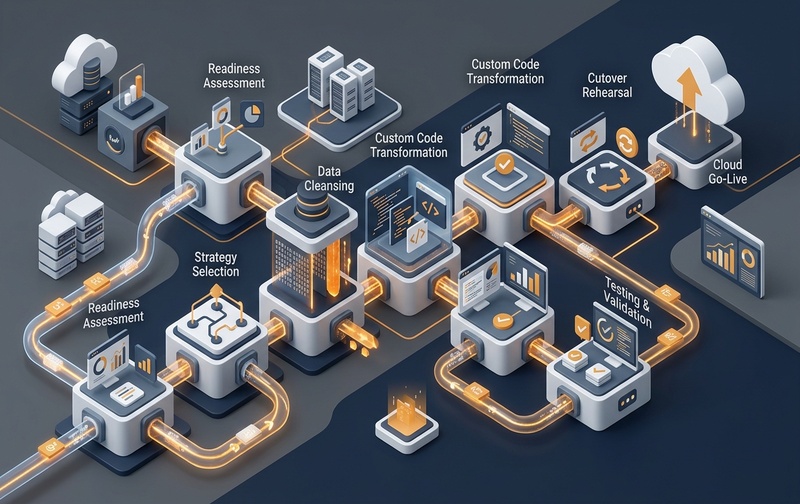
End-to-end SAP ECC to S/4HANA migration lifecycle from landscape readiness and cleansing through integration testing to production cutover.
Step 1: Define Business and Migration Objectives
Start by defining why the organization is moving.
Possible objectives include:
Without clear objectives, teams can make technically correct decisions that fail to support the business case.
Step 2: Assess the Existing ECC Landscape
Create visibility into:
The purpose is to identify what must be retained, changed, replaced or retired.
Step 3: Select the Migration Approach
Compare:
Do not decide solely from implementation cost.
Evaluate each option against business-process requirements, data strategy, organizational change and future architecture.
Step 4: Define the Data Migration Strategy
Classify information into:
Step 5: Assess Custom Code and Integrations
Determine:
Step 6: Configure or Transform Business Processes
Depending on the migration approach, this may involve retaining existing configuration, selectively redesigning workflows or implementing new processes based on S/4HANA capabilities.
Step 7: Execute Data Migration and Technical Transition
Migration execution may include data extraction, mapping, transformation, loading and reconciliation.
SAP provides the SAP S/4HANA Migration Cockpit as part of its migration tooling for supported migration scenarios and objects.
Step 8: Test the New Environment
Testing should validate both technical functionality and real business processes.
Step 9: Perform Cutover
The cutover plan coordinates the final transition to production.
It needs clearly defined:
Step 10: Stabilize and Optimize
Go-live should not be treated as the end of the transformation.
Hypercare should monitor:
SAP S/4HANA Data Migration: Clean Before You Move
One of the most expensive mistakes is assuming every byte of ECC history belongs in the future S/4HANA environment.
It may not.
A stronger SAP S/4HANA data migration strategy asks:
What data is still operationally necessary?
Separate operational requirements from historical curiosity.
Moving unnecessary information adds volume without necessarily adding business value.
What data must be retained for compliance?
Legal, tax, contractual or industry requirements may determine retention needs.
Retention does not automatically mean all information must remain inside the productive S/4HANA database.
What data quality problems already exist?
Migration does not automatically correct:
Moving bad data simply moves the problem.
What should be archived?
Data archiving can reduce the migration footprint and simplify the future environment where appropriate.
How will migrated data be validated?
Reconciliation should verify not only record counts but business accuracy.
Important validation may include:
Good migration is not about transferring the maximum amount of data.
It is about transferring the right information with demonstrable integrity.
How Custom Code Affects SAP ECC to S/4HANA Migration
Years of ECC usage often create significant custom development.
Some of it may be essential.
Some may no longer have users.
Some may duplicate capabilities now available in standard SAP functionality.
Treating all custom code as equally valuable can unnecessarily increase migration effort.
Before remediation, classify custom developments as:
Retain
Business-critical and still required.
Replace
Standard S/4HANA functionality can meet the requirement.
Redesign
Requirement remains, but the existing implementation is unsuitable.
Retire
No meaningful business use remains.
This supports a cleaner architecture and helps prevent technical debt from being carried automatically into the future environment.
The principle should be simple:
Do not migrate complexity merely because it already exists.
Integration Planning During ECC-to-S/4HANA Migration
ERP rarely operates alone.
An ECC environment may exchange information with dozens or hundreds of other applications.
Examples include:
An interface that technically connects does not necessarily mean it will behave correctly after the underlying process or data model changes.
Create an integration inventory that captures:
| Integration | Business Owner | Technology | Data Exchanged | Business Criticality | S/4HANA Impact |
|---|---|---|---|---|---|
| CRM | Sales | API/Middleware | Customers/Orders | High | Review |
| Banking | Finance | File/API | Payments | Critical | Validate |
| Warehouse | Operations | Interface | Inventory | Critical | Retest |
This reduces the risk of discovering critical dependencies during late testing.
SAP S/4HANA Migration Cost Drivers
There is no universal SAP S/4HANA migration cost.
The budget depends on the landscape and transformation scope.
Instead of asking only:
“How much does S/4HANA migration cost?”
decision-makers should ask:
Which conditions in our current ECC landscape will drive cost?
1. Migration Approach
A technical conversion has a different effort profile from a greenfield transformation or selective transition.
2. Custom Code
Large volumes of active custom development can increase assessment, remediation and regression-testing requirements.
3. Data Volume and Quality
More data does not automatically mean more business value, but it can create additional migration and validation work.
4. Number of Integrations
Each critical integration may require assessment, modification and testing.
5. Business-Process Redesign
More transformation usually requires greater involvement from process owners, functional teams and users.
6. Testing Complexity
Testing can expand when organizations operate across multiple geographies, legal entities, plants, currencies, languages and industry-specific workflows.
7. Infrastructure and Deployment
Cloud, private cloud and on-premises models introduce different architecture and operating considerations.
8. Organizational Change
Training, communication and role redesign also require resources.
9. Scope Expansion
One of the biggest cost risks is uncontrolled scope.
A programme that begins as an ERP transition can gradually absorb unrelated reporting, integration, process and transformation requests.
How to Reduce SAP S/4HANA Migration Cost Overruns
Cost control begins before implementation.
Establish scope boundaries early
Define what is:
Reduce unnecessary data before migration
Do not pay project effort to move information the future environment does not require.
Prioritize custom-code remediation
Start with high-impact developments and eliminate unused code.
Identify integration dependencies early
Late discovery increases rework.
Make process decisions before build cycles expand
Unresolved business decisions can create configuration churn and repeated testing.
Use governance for change requests
Every scope addition should have a visible effect on:
Cost overruns are often not caused by one catastrophic event.
They accumulate through unresolved dependencies, small scope additions, repeated remediation and late decisions.
SAP ECC to S/4HANA Migration Risks and Mitigation Strategies
| Migration Risk | Business Impact | Mitigation |
|---|---|---|
| Poor data quality | Incorrect transactions and reporting | Profile, cleanse and validate before migration |
| Excessive custom code | Higher remediation and testing | Assess usage and retire unnecessary developments |
| Undocumented integrations | Process failures after go-live | Build an interface inventory early |
| Weak scope governance | Budget and timeline growth | Use formal change control |
| Inadequate testing | Production disruption | Plan multiple testing cycles |
| Limited business involvement | Incorrect process design | Assign process owners |
| Unclear cutover plan | Extended disruption | Run mock cutovers |
| Weak user readiness | Slow adoption | Plan training and change management |
The purpose of risk management is not to eliminate every uncertainty.
It is to expose uncertainty early enough to make controlled decisions.
SAP S/4HANA Testing Strategy Before Go-Live
Testing should validate business continuity—not simply confirm that technical components launch successfully.
Unit Testing
Tests individual configurations or developments.
Integration Testing
Confirms that processes work across systems and applications.
End-to-End Business Process Testing
Validates complete workflows such as:
Sales order → delivery → billing → accounting
or:
Purchase requisition → purchase order → goods receipt → invoice → payment
Regression Testing
Checks whether existing critical processes continue to behave as expected.
User Acceptance Testing
Business users verify whether the system supports operational requirements.
Data Reconciliation
Confirms migrated information against the legacy environment.
Performance Testing
Validates critical workloads and response expectations.
Cutover Rehearsal
A mock cutover helps verify sequence, responsibilities, dependencies and expected downtime before production transition.
Testing should be designed around business risk, not merely module ownership.
Building an SAP S/4HANA Migration Business Case
A business case should not depend only on an approaching maintenance milestone.
A stronger case connects migration with measurable business priorities.
Consider:
Technology Outcomes
Operational Outcomes
Financial Outcomes
Strategic Outcomes
Migration creates more value when technology changes are tied directly to operating-model improvements.
SAP ECC to S/4HANA Migration Checklist for CIOs
Before approving the programme, verify that your team can answer the following questions.
Strategy
Processes
Data
Custom Code
Integrations
Cloud and Infrastructure
Testing
Governance
If several of these questions cannot be answered confidently, the organization may not yet be ready to finalize implementation scope.
Choosing an SAP ECC to S/4HANA Migration Partner
A migration partner should contribute more than technical execution capacity.
Evaluate whether the partner can help assess:
Ask potential partners:
How will you determine whether brownfield, greenfield or selective transition suits our environment?
How will you identify unused custom code before remediation begins?
How will historical data requirements affect the migration strategy?
How will integrations be inventoried and tested?
How will migration scope changes be controlled?
What does your cutover planning process include?
How will business users participate in testing?
The goal is not simply to find a partner capable of performing a technical conversion.
It is to find one capable of helping the organization make the right decisions before expensive implementation work begins.
SAP ECC to S/4HANA Migration: From Deadline Project to Controlled Transformation
SAP ECC to S/4HANA migration should not begin with a technical migration tool.
It should begin with clarity.
Clarity about which processes deserve to survive.
Clarity about which data deserves to move.
Clarity about which customizations still create value.
Clarity about which integrations matter.
Clarity about the future deployment architecture.
And clarity about the risks and costs hidden inside the existing ECC environment.
Organizations that establish these facts early can select the appropriate migration approach, build a more realistic roadmap and reduce the risk of discovering major complexity during execution.
With mainstream maintenance for applicable SAP Business Suite 7 core applications currently scheduled through the end of 2027, waiting until the deadline is close can reduce the time available for those decisions.
The objective is therefore not simply to move from ECC to S/4HANA.
It is to move with a controlled scope, a defendable business case and an architecture that supports what comes next.
Frequently Asked Questions About SAP ECC to S/4HANA Migration
Planning Your SAP ECC to S/4HANA Migration?
Before finalizing your migration approach, implementation scope, or budget, understand the areas that could affect your S/4HANA transition.
Emerging Alliance can help evaluate your ECC landscape, data, custom code, integrations, deployment options, and migration requirements to identify the right approach for your business.
Schedule Your SAP S/4HANA Migration Demo